As Amazon Associates, we earn from qualifying purchases. This means we may receive a small commission at no extra cost to you if you click through and make a purchase.
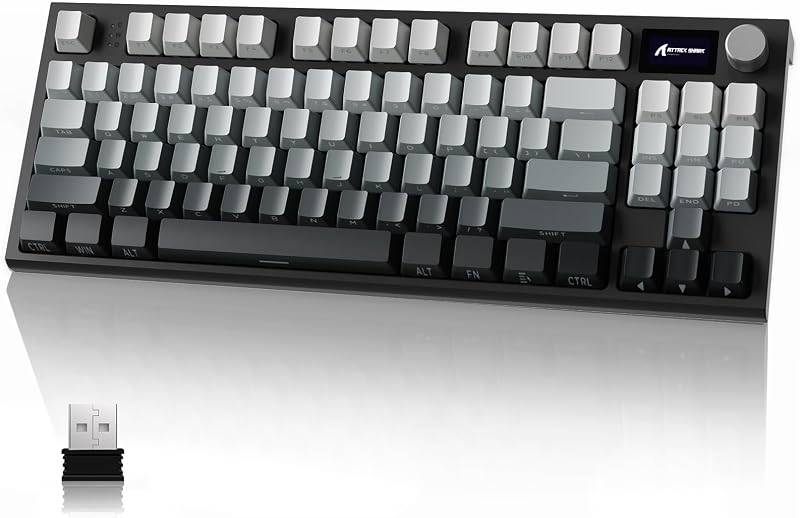
The Attack Shark K86 enters the desktop peripheral space as a feature-packed 75-percent wireless mechanical keyboard built to handle diverse daily tasks. Equipped with a cushioned gasket suspension, factory-lubricated linear switches, tri-mode wireless flexibility, and an integrated smart display screen with a rotary metal knob, it presents an adaptable solution for crowded desks. Our evaluation shows that it serves as an exceptionally versatile, comfortable typing peripheral that bridges the gap between specialized mechanical keyboards and functional home workstation accessories.
This compact keyboard suits multi-device households, home-office professionals, and students who frequently shift between homework assignments, media streaming, and evening gaming sessions across different operating systems. Those who demand a full-size traditional number pad for rapid financial data entry or who prefer an ultra-rigid metal enclosure will find the layout and plastic case design less aligned with their preferences.
Attack Shark K86 at a Glance
| Feature | Specification Details |
|---|---|
| Layout and Form Factor | 75% ANSI compact layout (82 to 86 keys) |
| Mounting Architecture | Gasket mount system with flexible polycarbonate (PC) plate |
| Mechanical Switches | Custom Blue Whale linear switches |
| Hot-Swap Sockets | TTC E-Sport sockets (3-pin and 5-pin compatible, up to 10,000 swap cycles) |
| Acoustic Dampening | Triple-layer sound absorption: EVA PCB foam, bottom foam, and IXPE switch pad |
| Keycap Construction | Double-shot PBT keycaps with side-printed legends |
| Connectivity Modes | Tri-mode: Bluetooth 5.0, 2.4GHz wireless dongle, and USB-C wired |
| Battery Capacity | 4000 mAh rechargeable internal battery |
| Integrated Hardware Controls | Smart TFT color display screen and multi-function CNC metal knob |
| Lighting Configuration | Per-key RGB backlight (18 modes, 9 colors) and 2-side RGB rim lights (6 modes) |
Gasket Architecture and Sound-Dampened Typing Feel
The internal engineering of any modern keyboard dictates how comfortable your fingers feel after hours of typing essays, reports, or working through long email threads. The Attack Shark K86 implements an enthusiast-style suspension known as a gasket mount. Instead of screwing the switch-bearing circuit board directly into the hard plastic shell, the interior assembly is cushioned along the perimeter. Paired with a flexible polycarbonate plate, the attack shark k86 gasket mount cushions each keystroke, offering a soft bottom-out sensation that helps alleviate joint fatigue during extended family typing sessions.
Acoustic management plays a massive role in whether a keyboard is pleasant to live with in a shared household or dorm room. Inside the chassis, the manufacturer integrated a triple-layer sound dampening stack composed of an IXPE switch pad, custom EVA PCB foam, and a dense bottom case foam. This configuration captures hollow vibrations and pinging sounds before they escape the enclosure. The resulting sound profile is clean, muted, and deep, ensuring that typing during late-night projects will not disrupt nearby family members or housemates.
The typing dynamic is completed by factory-lubricated attack shark k86 linear switches, identified in the official specifications as custom Blue Whale switches. Linear switches actuate smoothly in a straight downward motion without the tactile bump or high-pitched auditory click found in traditional office switches. This makes keystrokes effortless and fluid, catering equally well to rapid typing and smooth gaming inputs. For households that frequently pair high-response keyboards with accurate gaming mice such as the attack shark x11 pro v2, the immediate switch registration provides consistent and reliable responsiveness.
TTC E-Sport Hot-Swap Socket Engineering and Customization
Longevity in shared computer gear often depends on how easy it is to repair or refresh hardware when wear occurs. The attack shark k86 hot swappable switch design ensures that you are never locked into a single switch type for the lifespan of the board. Rather than soldering switches onto the circuit board permanently, the manufacturer installed specialized TTC E-Sport professional sockets. According to the factory data, these sockets deliver a 46 percent improvement in structural stability over baseline sockets and are rated to endure up to 10,000 switch insertion and removal cycles.
This design decision drastically bolsters long-term usability. If an accidental beverage spill degrades a single switch, or if an individual switch develops contact chatter after years of intense typing, you do not need to discard the entire peripheral. A user can simply pull the malfunctioning switch out using a standard removal tool and press a new one into place. Furthermore, the circuit board accommodates both 3-pin and 5-pin switch configurations, granting users complete freedom to experiment with tactile, clicky, or alternative linear switches whenever their typing preferences evolve.
Tri-Mode Connectivity and Multi-Device Family Flexibility
Modern family workstations are rarely dedicated to a single computer. A living room desk or shared home office frequently hosts a family desktop, school-issued Chromebooks, work laptops, and portable tablets. The attack shark k86 wireless mechanical keyboard tackles this reality through its tri-mode connection system, featuring low-latency 2.4GHz wireless via an included USB receiver, Bluetooth 5.0 for multi-device pairing, and a traditional USB-C wired connection for lag-free operation and charging.
Transitioning between these interfaces is managed cleanly without needing to navigate clumsy physical toggle switches hidden underneath the chassis. Instead, users can switch between wireless protocols directly through the top-mounted metal knob and status display. The Bluetooth connectivity enables rapid toggling between paired devices, letting a parent complete a spreadsheet on a work laptop before quickly swapping over to help a child reply to a message on an AAUB P30 tablet or secondary computer. For desktop setups utilizing lightweight wireless gear like the shark attack x3, the clutter-free wireless footprint keeps desk surfaces organized and organized.
Battery Capacity and Daily Power Management
Cordless peripherals must balance high-draw features with dependable endurance to remain practical for everyday home use. The Attack Shark K86 houses an integrated 4000 mAh rechargeable battery. This capacity provides sufficient energy to drive the wireless transmitters, internal microcontrollers, per-key RGB backlighting, side accent light strips, and the integrated color display screen throughout routine workweeks.
In actual operation, attack shark k86 battery life depends significantly on how you configure the peripheral’s illumination. The keyboard features 18 built-in RGB backlighting modes across 9 distinct colors, along with independent 2-side light strips boasting 6 lighting modes. Running all lighting channels alongside an active display animation will naturally deplete the 4000 mAh cell much faster than operating the keyboard with lowered brightness or static lighting. When the battery level dips, connecting the supplied USB-C cable replenishes the cell while allowing you to continue working or gaming without interruption.
Smart TFT Color Display and CNC Metal Knob Controls
One of the most noticeable hardware additions on this 75-percent keyboard is the dedicated interactive control cluster located in the upper-right corner. The attack shark k86 tft display provides immediate visual status monitoring without requiring background software utilities to remain open on your desktop. The integrated color screen conveys critical diagnostic metrics at a glance, including:
- Active connection channel (2.4GHz wireless, Bluetooth profile, or USB-C wired mode)
- Current operating system mode (Windows or Mac compatibility mappings)
- Real-time battery percentage level to eliminate unexpected shutdowns
- Current date and system time display
- Custom graphical animations, allowing users to upload personal GIF files via driver software
Sitting directly adjacent to the TFT screen is an integrated CNC metal rotary knob. This textured control provides intuitive tactile feedback when spun or pressed down. Users can quickly spin the knob to adjust operating volume, cycle through RGB lighting presets, or select between connection modes. For family members of varying tech comfort levels, having a dedicated physical dial to modify volume or check remaining battery charge simplifies everyday interactions considerably.
Build Quality, Materials, and Household Durability
Everyday family computing environments present unique hazards, ranging from snack crumbs and heavy-handed typing to accidental drops from desktop surfaces. Assessing the attack shark k86 durability begins with its external shell and keycap construction. The chassis is crafted from molded plastic measuring 12.8 inches long, 4.9 inches wide, and 1.8 inches tall, creating a compact footprint that leaves plenty of room for wide mouse movements during gameplay or writing sessions.
To resist physical wear, the keyboard comes equipped with double-shot PBT keycaps featuring side-printed legends. Unlike cheaper ABS plastic keycaps that develop a slick, shiny surface and fade their printed letters over months of friction, PBT plastic maintains a textured, oil-resistant matte finish. The double-shot manufacturing process molds the keycap legends out of an entirely separate plastic layer, ensuring the lettering can never rub off. The side-printed orientation keeps the top surface completely clean while allowing the RGB illumination to shine through clearly from beneath.
When considering the overall attack shark k86 specs, the combination of a polycarbonate flex plate, robust TTC sockets, and dense internal dampening yields a chassis that feels solid without excessive weight. The ambidextrous compact form factor fits neatly onto compact student study carrels while maintaining broad operating system compatibility across Windows 10, Linux, and Mac platforms.
Assessing Everyday Value: Is the Attack Shark K86 Worth It?
When outfitting a home office or student desk, buyers must determine whether an enthusiast-grade mechanical peripheral provides tangible benefits over basic office equipment. Asking whether the is attack shark k86 worth it comes down to analyzing the collection of features integrated into its mid-sized chassis. Rather than forcing shoppers to compromise between wireless flexibility, hot-swappable switch longevity, and ergonomic typing acoustic design, the K86 brings these disparate features together in an accessible layout.
The keyboard proves particularly valuable for users seeking an engaging peripheral for both productivity and gaming. Evaluating the attack shark k86 for gaming reveals distinct advantages: the compact 75-percent ANSI layout preserves vital arrow keys and navigation buttons while eliminating the bulky number pad, freeing up substantial desk area. When combined with nimble gaming mice like the attack shark x11 se, players enjoy uninhibited sweep angles across their mousepads. The inclusion of reliable 2.4GHz wireless transmission and smooth linear switches ensures inputs register instantaneously during fast-paced competitive sessions.
Attack Shark K86 Pros and Cons
Pros
- Cushioned gasket mount with flexible PC plate
- TTC E-Sport hot-swap sockets rated for 10,000 cycles
- Triple-mode wireless with 4000 mAh battery
- Smart TFT color display and metal knob
- Durable double-shot PBT side-print keycaps
- Triple-layer sound absorbing foam dampening
Cons
- Lacks dedicated ten-key numeric pad
- Plastic case instead of metal construction
- Display and side RGB increase battery drain
Who Should Buy the Attack Shark K86
Buy It If
- You need a versatile tri-mode keyboard that seamlessly toggles between a shared family PC, study laptops, and tablets via Bluetooth and 2.4GHz wireless.
- You value a cushioned typing feel and quiet sound profile, thanks to the gasket mount, polycarbonate plate, and triple-layer EVA and IXPE dampening foams.
- You want long-term switch serviceability supported by durable TTC E-Sport hot-swap sockets rated for 10,000 cycles without soldering.
- You appreciate quick visual status updates on battery percentage and connection mode directly from an integrated color TFT screen and rotary knob.
Skip It If
- Your daily workflow requires a dedicated physical ten-key number pad for heavy spreadsheet data entry and bookkeeping calculations.
- You prefer heavy, industrial all-metal keyboard enclosures over a lightweight plastic chassis design.
- You strictly favor loud, highly tactile clicky mechanical switches out of the box rather than smooth, quiet linear switches.
Attack Shark K86 Alternatives Worth a Look
If the specific layout, switch type, or wireless architecture of the Attack Shark K86 does not entirely match your desk requirements, several alternative models provide contrasting strengths.
Redragon Mechanical Gaming Keyboard Wired
4.5 out of 5, average from Amazon buyers
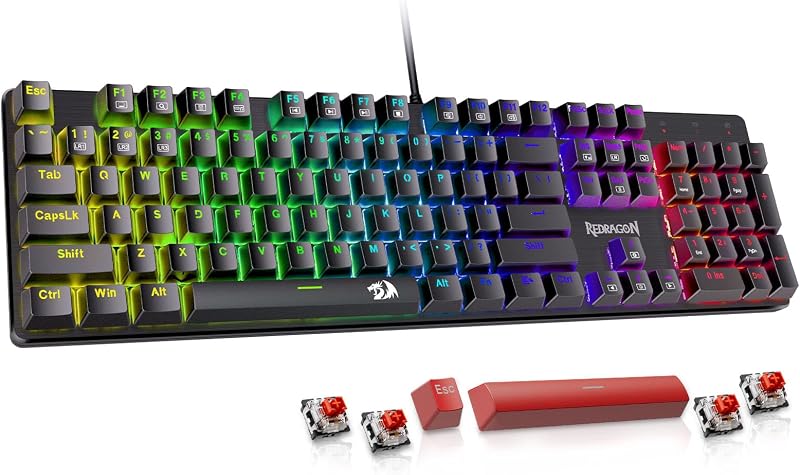
The Redragon Mechanical Gaming Keyboard Wired provides a focused, tethered solution built around hot-swappable red linear switches, 11 programmable backlit modes, anti-ghosting technology, and double-shot PBT keycaps. It supports both PC and Mac operating environments. Shoppers should consider this keyboard if they prefer a permanent wired USB connection that completely eliminates battery recharging routines, wireless interference concerns, and wireless pairing management.
Backlit
4.3 out of 5, average from Amazon buyers
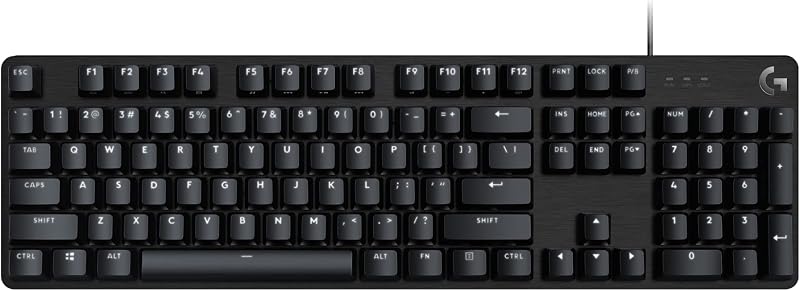
Listed under the title Backlit, the Logitech G413 SE is a full-size mechanical gaming keyboard constructed with an aluminum alloy top case, anti-ghosting matrix, and white LED backlighting compatible with Windows and macOS. This alternative serves households that require a full 104-key layout with an integrated number pad for accounting and administrative work, while offering the rigid feel of a metal frame instead of a compact 75-percent plastic enclosure.
Kisnt KN98 Wireless Mechanical Keyboard
4.1 out of 5, average from Amazon buyers
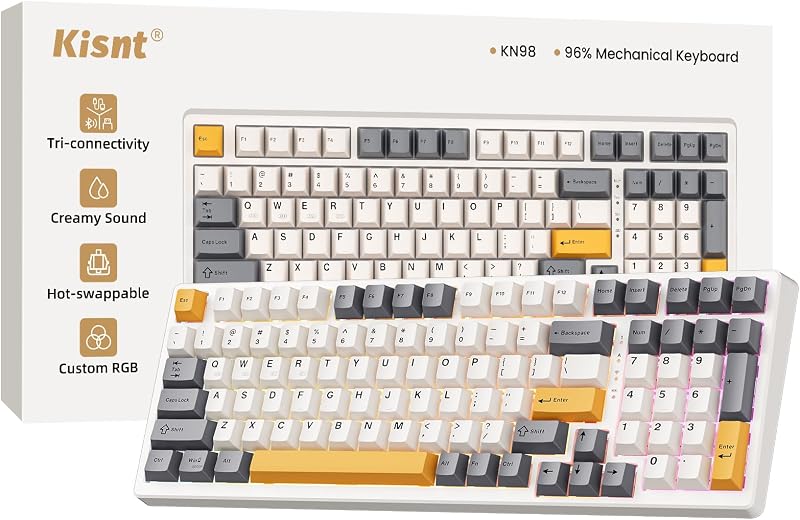
The Kisnt KN98 Wireless Mechanical Keyboard features a 99-key compact layout that includes a condensed numeric keypad while retaining tri-mode wireless connectivity across Bluetooth, 2.4GHz, and USB-C. It features custom RGB lighting, hot-swappable switch sockets, acoustic sound dampening, and an expanded 8000mAh battery. Users who love the wireless flexibility and quiet typing characteristics of modern mechanical boards but cannot sacrifice their dedicated number pad should look toward this model.
Final Verdict
The Attack Shark K86 successfully bridges the gap between boutique keyboard customization and everyday family computing convenience. By incorporating a compliant gasket mount structure, factory-lubed linear Blue Whale switches, and comprehensive triple-layer foam dampening, it delivers a soft, quiet, and satisfying typing experience that prevents finger fatigue and avoids disturbing quiet household environments. The inclusion of high-durability TTC E-Sport hot-swap sockets ensures that the keyboard can be repaired or customized for years to come.
While users dependent on a traditional ten-key numeric pad will need to consider larger form factors, the K86 offers an exceptional blend of modern hardware features for general productivity, multi-device management, and gaming. Its smart TFT status screen, tactile CNC metal control knob, and durable double-shot PBT keycaps make it an easy recommendation for anyone looking to modernize their workspace with a reliable, feature-rich wireless mechanical keyboard.
FAQ
How do you switch connection modes on the Attack Shark K86?
You can toggle between 2.4GHz wireless, Bluetooth 5.0, and USB-C wired modes using the integrated CNC metal rotary knob alongside the TFT color display screen. Turning the knob allows you to highlight your preferred connectivity channel, which is visually confirmed on the screen without needing to flip the keyboard over.
Can you replace the switches on the Attack Shark K86 without soldering?
Yes, the Attack Shark K86 features hot-swappable TTC E-Sport switch sockets that support both 3-pin and 5-pin mechanical switches. You can easily remove existing switches using a standard switch puller and press replacement switches directly into the sockets without touching a soldering iron.
What information does the Attack Shark K86 TFT screen display?
The built-in color TFT display presents essential real-time status data, including your active connection mode, battery charge level percentage, Windows or Mac operating system layout status, date, and time. Users can also upload custom animated GIF graphics to the screen via the companion software driver.
Does the Attack Shark K86 work with Mac and Linux computers?
Yes, the keyboard features cross-platform compatibility with Windows, Linux, and macOS systems. The TFT screen displays whether the board is currently set to Windows or Mac layout mode, ensuring key mappings function properly across different machines.
What are the benefits of the gasket mount structure on this keyboard?
The gasket mount design suspends the internal polycarbonate plate and circuit board on soft cushioning pads rather than anchoring them rigidly with screws. This creates a flexible, cushioned typing feel that absorbs finger impact while collaborating with internal foam dampening to produce a deeper, quieter sound profile.


