As Amazon Associates, we earn from qualifying purchases. This means we may receive a small commission at no extra cost to you if you click through and make a purchase.
The Attack Shark X11 SE enters a crowded market of lightweight gaming mice by stripping away unnecessary desktop clutter to prioritize pure mobility and responsive control. Built around an agile 59-gram chassis and an optical sensor capable of reaching 22,000 DPI, this tri-mode pointer is designed to shift seamlessly between demanding evening gaming sessions and routine daytime computer chores. Rather than forcing users to juggle dedicated docks or clunky desktop utilities, the mouse emphasizes streamlined operation, durable Huano micro switches, and direct browser-based configuration. Our comprehensive Attack Shark X11 SE review finds that it provides an impressively responsive and clutter-free experience that punches well above its understated exterior.
This versatile pointer is an outstanding fit for shared family workstations, student desks, and casual esports enthusiasts who prioritize a nimble glide alongside flexible multi-device pairing. Households running a mix of Windows, macOS, and Linux hardware will appreciate the friction-free wireless versatility, especially when paired with modern desktop peripherals like the attack shark k86 keyboard. However, competitive players who require ultra-deep macro customization across dozens of dedicated inputs, or those who insist on bundled magnetic charging stands, will want to evaluate heavier or more feature-dense alternatives before committing.
Attack Shark X11 SE at a Glance

| Attribute | Detail |
|---|---|
| Weight | 59 grams |
| Sensor Model | PixArt PAW3311 Optical Sensor |
| Maximum Sensitivity | 22,000 DPI (Programmable) |
| Tracking Speed & Acceleration | 400 IPS, 40g Acceleration |
| Connectivity Modes | Tri-Mode: 2.4GHz Wireless, Bluetooth, Wired USB-C |
| Main Control Chip | BK52820 |
| Primary Switches | Huano Micro Switches (20 Million Clicks) |
| Total Button Count | 5 Buttons |
| Operating System Support | Windows, macOS, Linux |
| Manufacturer Warranty | 1 Year Manufacturer |
Sensor Tracking and Competitive Gaming Precision
The primary draw of the Attack Shark X11 SE gaming mouse is its internal tracking core. Powered by the PixArt PAW3311 optical sensor, this pointer delivers a maximum sensitivity of 22,000 programmable DPI alongside a rapid 400 IPS tracking speed and 40g maximum acceleration. For everyday computer tasks, these figures translate into clean, predictable cursor movement across both high-resolution multi-monitor desktop setups and compact laptop screens. During fast-paced titles, the Attack Shark X11 SE PAW3311 hardware actively minimizes sensor jitter, smoothing, and frame skipping, allowing quick reflex swipes to register cleanly on screen without sudden disorienting jumps.
Managing the sensor data is a customized BK52820 flagship main control chip. This controller handles signal processing to maintain low-latency responsiveness whether you are executing precise sniper micro-adjustments or rapidly navigating crowded office spreadsheets. When evaluating the Attack Shark X11 SE for gaming, players who favor first-person shooters or arena battlers will notice the sensor maintains consistent tracking fidelity even through intense, high-velocity mouse sweeps. The surface tracking works reliably across standard cloth mouse pads as well as hard gaming surfaces, avoiding the sensor spin-outs that often plague entry-level wireless mice.
While the 22,000 DPI ceiling is far higher than what most gamers use during realistic gameplay, having that overhead ensures the sensor tracking curve remains stable at common tournament settings like 800, 1,600, or 3,200 DPI. Gamers familiar with nimble alternatives like the shark attack x3 will appreciate how this sensor architecture balances tracking accuracy against energy conservation, giving players the responsiveness required for competitive titles without inducing tracking stutter during critical engagements.
Tri-Mode Connectivity and Multi-Device Flexibility
Modern desks frequently serve multiple purposes throughout the day, and the Attack Shark X11 SE wireless architecture is engineered to match that reality. Equipped with tri-mode connectivity, the mouse lets users alternate between low-latency 2.4GHz wireless, Bluetooth mode, and a standard wired USB-C connection. The 2.4GHz wireless channel delivers the rapid response time necessary for twitch gaming, utilizing a compact USB dongle that slots directly into your PC tower or gaming laptop. For general productivity, office work, or homework sessions on a secondary machine, switching over to Bluetooth preserves valuable USB ports while maintaining stable navigation across different operating systems.
Cross-platform compatibility is an important strength for busy households. The mouse provides plug-and-play operation across Windows, macOS, and Linux systems without requiring platform-specific workarounds. A parent can easily keep the mouse paired to an office laptop via Bluetooth during work hours, then switch over to the 2.4GHz dongle plugged into a family gaming rig for evening recreation. If the internal battery runs low in the middle of a gaming match, plugging in the USB-C cable instantly switches the device into a responsive wired mouse that recharges while you continue playing.
Physical switching between these three connection methods is handled on the mouse body, eliminating complicated button combinations. The connection remains stable even in environments crowded with competing Wi-Fi signals, smart home hubs, and wireless mobile devices. The versatility of the BK52820 controller prevents sudden packet drops or erratic cursor skipping, making it as reliable for long essay writing as it is for cooperative gaming raids.
Lightweight Build and Everyday Ergonomic Comfort
Weighing in at just 59 grams, the chassis provides an exceptionally agile feel that immediately reduces wrist strain during prolonged computing sessions. When comparing the Attack Shark X11 SE vs X11, the primary physical evolution is the elimination of the bulky proprietary charging dock. Removing the internal charging base contacts and redesigning the internal skeleton allowed engineers to trim the overall weight down to 59g. This makes the SE variant distinctly lighter and noticeably more maneuverable than the original X11, catering directly to gamers who prefer minimal resistance during swift sweeping movements.
Despite its featherweight construction, the shell avoids the honeycomb cutout holes seen on many competing ultralight mice. Instead, the exterior utilizes a solid, frosted texture that repels sweat and provides a secure, tactile grip for palms of all sizes. The ergonomic contours accommodate palm, claw, and fingertip grip styles naturally. The gentle slope supports the hand during regular web browsing, while the tapered sides offer ample leverage for fingertip adjustments when making split-second corrections in competitive matches.
Underneath the primary left and right buttons, the mouse features customized Huano micro switches rated for 20 million clicks. Huano’s engineering team optimized the actuation pressure in grams, resulting in a softer, more flexible click feel that avoids the finger fatigue associated with overly stiff micro switches. Importantly, these switches are engineered to resist double-clicking errors over time, ensuring that single taps register accurately throughout years of demanding clicks, clicks, and drags. The five-button layout includes the two primary clickers, a textured scroll wheel, and two low-profile side thumb buttons placed within easy reach.
Cloud Drive Configuration and Battery Practicality
One of the most practical innovations found on the mouse is its approach to customization. Rather than forcing users to download, install, and constantly update bloated background software suites, the Attack Shark X11 SE software operates through an intelligent cloud drive webpage. Once you navigate to the web-based utility, the cloud drive automatically identifies your connected computer system. From the browser tab, you can adjust DPI stages, reassign button functions, fine-tune the report rate, and tweak sensor parameters directly into onboard storage.
This web-first configuration is a significant benefit for families sharing a single computer or students using school-managed laptops where administrative restrictions block traditional executable installers. You can customize your preferences on any machine with internet access, and the settings persist inside the mouse hardware. Those interested in comparing this web setup with other variants in the lineup can read our attack shark x11 pro v2 breakdown to see how the cloud platform performs across different revisions.
When considering the Attack Shark X11 SE battery life, the manufacturer listing confirms the unit features an internal rechargeable cell replenished via USB-C, though the listing does not specify the exact milliamp-hour capacity or total operating hours per charge. In practical everyday use, the tri-mode efficiency of the BK52820 chip and the absence of battery-draining exterior RGB lighting zones help extend usable time between charges. Because the mouse can be recharged while in use via any standard USB-C port, keeping the device powered does not disrupt ongoing work or leisure.
Attack Shark X11 SE Pros and Cons
Pros
- Ultra-lightweight 59g chassis reduces fatigue
- Accurate PixArt PAW3311 22,000 DPI sensor
- Tri-mode connectivity: 2.4GHz, Bluetooth, and USB-C
- Web-based cloud driver avoids software bloat
- Durable Huano switches rated for 20M clicks
Cons
- Listing does not specify battery run time
- Lacks the charging dock from original X11
- Basic five-button layout limits complex macros
Who Should Buy the Attack Shark X11 SE
Buy It If
- You want an ultra-lightweight 59g mouse that minimizes wrist strain during long hours of work or play.
- You need seamless tri-mode connectivity to alternate between personal gaming PCs, work laptops, and tablets without unplugging dongles.
- You prefer driverless, web-based software configuration that avoids cluttering your computer with heavy background applications.
- You appreciate durable Huano switches rated for 20 million clicks with a soft, fatigue-free actuation feel.
Skip It If
- You prefer a hefty, weighted mouse with modular balance plates or extensive thumb rests.
- You specifically want a dedicated magnetic desktop charging dock included in the package.
- Your primary gaming genre is MMOs or complex simulation titles that demand ten or more programmable macro buttons.
Attack Shark X11 SE Alternatives Worth a Look
While this lightweight pointer covers the essentials exceptionally well, different gaming genres and ergonomic preferences may lead you toward other proven options on the market.
Logitech G305 Lightspeed
4.9 out of 5, average from Amazon buyers
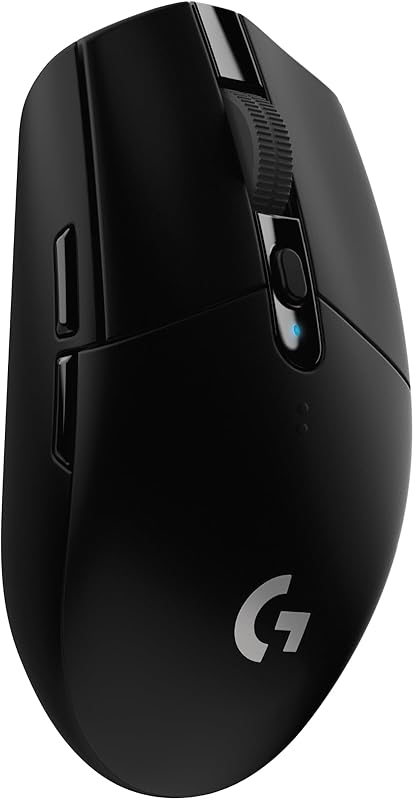
The Logitech G305 Lightspeed Wireless Gaming Mouse – Black is an established classic that relies on a single AA battery to deliver up to 250 hours of battery life. Featuring a 12,000 DPI sensor, on-board memory, and six programmable buttons, it is an ideal choice for buyers who dislike recharging internal batteries and prefer swapping out standard disposable or rechargeable cells.
Logitech G502 Hero
For users who find 59 grams far too light, the Logitech G502 Hero Wired Gaming Mouse – Black offers a dramatically different experience. It brings a 25,600 DPI sensor, full RGB illumination, adjustable weights, and 11 programmable buttons. Gamers who prioritize macro density and physical heft over wireless agility will prefer this wired heavyweight.
ASUS ROG Keris
4.1 out of 5, average from Amazon buyers
The ASUS ROG Keris Ultra Lightweight Wired Gaming Mouse features an ultra-lightweight body, a 16,000 DPI sensor with 400 IPS speed, and high-end hot-swap switch sockets with PBT buttons. It suits dedicated PC gamers who prefer a permanent wired connection with paracord flexibility and modular switch replacement over wireless convenience.

Final Verdict
When assessing whether the mouse meets the needs of modern desktop users, the central question is simple: is Attack Shark X11 SE worth it for everyday setups? For players and households seeking a nimble, durable, and highly capable wireless pointer, the answer is a definitive yes. By combining an agile 59-gram solid shell with the accurate PixArt PAW3311 sensor and tri-mode flexibility, it handles everything from rapid twitch shooters to routine web browsing with effortless stability.
The decision to ditch the charging dock in favor of a lighter body and web-based cloud configuration makes the mouse a remarkably practical tool. It removes the friction of proprietary software installs and heavy charging accessories while delivering dependable tracking and a satisfying click feel. If you value clutter-free performance, enduring Huano switches, and broad operating system versatility, this lightweight contender earns a solid recommendation for your desktop.
FAQ
How much does the Attack Shark X11 SE weigh?
The mouse features an ultra-lightweight build that weighs exactly 59 grams, making it significantly lighter than the original X11 model that included a desktop charging base.
What sensor is used inside the Attack Shark X11 SE?
The mouse is powered by the PixArt PAW3311 optical gaming sensor, supporting up to 22,000 programmable DPI, 400 IPS tracking speed, and 40g acceleration for precise cursor positioning.
Do I need to install software to change DPI or settings?
No, the mouse utilizes an innovative web-based cloud drive page. You can configure report rates, DPI stages, and custom button assignments directly in your web browser without installing background software.
How do I switch between wireless modes?
The mouse features a physical mode selector that lets you toggle between low-latency 2.4GHz wireless via the included USB dongle, Bluetooth mode for broad compatibility, and wired USB-C mode.
What operating systems are compatible with the mouse?
The Attack Shark X11 SE specs confirm compatibility with Windows, macOS, and Linux operating systems on personal computers.
How long is the manufacturer warranty?
The product includes a 1-year manufacturer warranty covering hardware defects from the date of purchase.


