As Amazon Associates, we earn from qualifying purchases. This means we may receive a small commission at no extra cost to you if you click through and make a purchase.
The Raspberry Pi 5 represents a dramatic leap forward in compact computing performance, delivering a capable desktop-class architecture on an ultra-compact single-board footprint. Featuring an updated quad-core ARM Cortex-A76 processor running at 2.4 GHz alongside 8 GB of onboard memory, this board handles multitasking, educational programming, and centralized home automation with remarkable responsiveness. For households seeking an energy-conscious, durable foundation for networked digital projects, its modern architecture proves to be an exceptionally solid workhorse.
This single-board computer suits tech-minded families, makers, and smart home managers who want a long-lasting, versatile system that can consolidate household network services, run ad-blocking firewalls, or power educational computer science experiments for students. Those who expect a pre-assembled, plug-and-play desktop experience with an included chassis, power brick, and cables should look toward conventional mini PCs, as setting up this bare hardware platform requires acquiring basic accessories and configuring an operating system independently.
Raspberry Pi 5 at a Glance
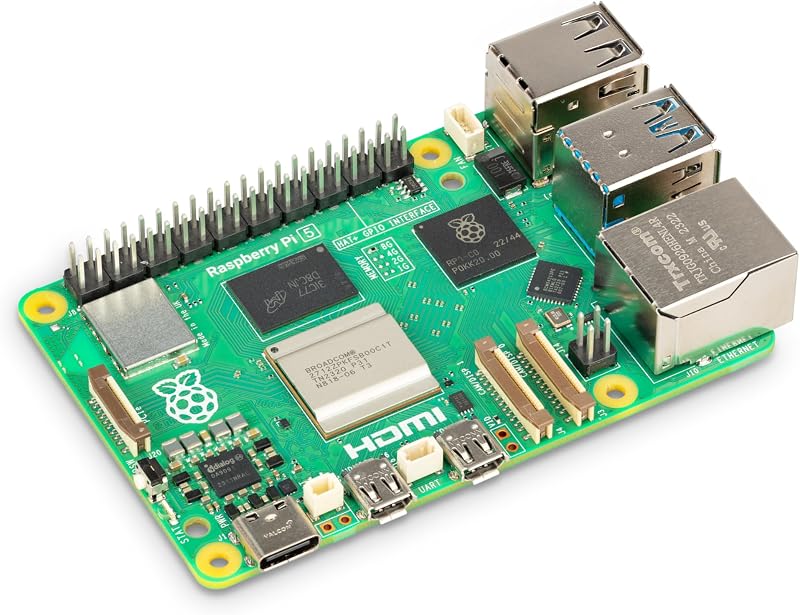
| Attribute | Detail |
|---|---|
| Brand | Raspberry Pi |
| Model Number | Model SC1112 |
| Processor | Quad-core ARM Cortex-A76 running at 2.4 GHz |
| Installed RAM | 8 GB |
| Listing Memory Capacity | 8 GB |
| Display Output | Dual 4K micro HDMI ports |
| Primary Power Input | USB-C power input |
| USB Connectivity | High-speed USB 3.0 ports |
| Storage Expansion | PCIe FPC connector for M.2 NVMe SSD adapters |
Processing Power and Core Hardware Architecture
At the center of the hardware upgrades lies a quad-core ARM Cortex-A76 processor clocked at 2.4 GHz. Compared to earlier hardware generations, this chip delivers substantially higher processing throughput per clock cycle, allowing demanding computational workflows to complete without frustrating slowdowns. Household users who plan to run background automation daemons while browsing modern web applications will notice immediate performance gains, as complex web scripts and local media streams process fluidly.
The internal memory layout provides a generous 8 GB configuration, enabling smooth concurrency when balancing containerized environments, home automation brokers, and student coding workspaces. Reviewing the overall raspberry pi 5 specs demonstrates that the platform has transitioned from a minimalist hobbyist experiment into a full-fledged low-power computing node. When weighing long-term hardware longevity, the raspberry pi 5 8gb value stands out because software overhead grows every year, and having ample physical memory ensures that future software operating system updates will not bottleneck the hardware prematurely.
Video processing capabilities have also received an upgrade through dual 4K micro HDMI ports. Families utilizing the board for dual-monitor computer learning stations or high-resolution household dashboards can drive two ultra-high-definition screens simultaneously. This visual clarity makes working in terminal windows, reading digital textbooks, and editing software code easier on the eyes during prolonged study sessions.
Power over Ethernet and Clutter-Free Cable Management
For modern smart homes, running discrete power bricks to closets, utility shelves, or attic entryways creates unwanted cord clutter and increases the risk of accidental disconnects. Utilizing raspberry pi 5 power over ethernet allows the system to receive both high-speed local data and steady direct-current power over a single standard category network cable. While the board listing explicitly notes standard USB-C power input, the board layout is designed to work with add-on hardware to accept power over network infrastructure.
To implement raspberry pi 5 poe functionality, the listing does not specify integrated power transformers on the base board, meaning users must introduce an auxiliary raspberry pi 5 poe hat or an external PoE splitter to direct power into the board safely. Integrating network-delivered power is ideal when mounting hardware alongside enterprise-style networking gear like a unifi u7 lite access point. Running a single Ethernet drop keeps utility panels tidy, eliminates cumbersome AC adapter bricks, and centralizes battery backup protection if the main network switch is connected to an uninterruptible power supply.
When organizing a dependable raspberry pi 5 poe setup, physical stability and connection integrity become priority considerations. Network cables clip securely into place, ensuring the board cannot be accidentally turned off if bumped inside a utility closet. This reliability is especially advantageous for outdoor or remote peripheral hubs linked through a wavlink ac1200 outdoor wifi extender, where reaching an electrical socket might otherwise require lengthy, hazard-prone extension cords.
Storage Expansion and High-Speed Connectivity
Storage performance has historically been a vulnerable link in single-board computer reliability, as continuous read-write cycles can degrade basic flash memory cards over extended service periods. The board tackles this challenge head-on by including a dedicated PCIe expansion FPC connector. This interface enables direct connectivity for M.2 NVMe solid-state drives when paired with a compatible adapter board, granting households access to enterprise-grade solid-state storage reliability and significantly faster file transfers.
In addition to internal PCIe expansion, the board features dual high-speed USB 3.0 ports alongside additional connectivity. These high-throughput ports make it simple to attach high-capacity external drives for local family backups, network-attached storage pools, or offline digital libraries. Having reliable bandwidth across peripheral buses prevents backup bottlenecks, ensuring scheduled midnight file synchronizations complete quickly without tying up system resources.
Users who enjoy creative camera monitoring or nature observation setups can take advantage of the dual high-speed camera and display interfaces. Pairing this high-speed architecture with specialized sensors such as the raspberry pi hq camera gives students and hobbyists the ability to construct powerful, high-resolution visual capture nodes that feed photos directly to network drives over local Ethernet lines.
Thermal Management and Long-Term Operating Stability
With an advanced 2.4 GHz quad-core processor packed into a tight physical board area, thermal behavior is an essential factor for continuous operation. When computing tasks push all four Cortex-A76 cores simultaneously, the board generates noticeable thermal energy. In unattended family server setups, adequate airflow is necessary to ensure the processor maintains its full clock speed without engaging safety thermal throttling mechanisms.
When planning an installation that combines network power delivery and continuous duty cycles, raspberry pi 5 cooling poe needs careful forethought. Because an add-on expansion hat mounts directly above the primary system board, it can restrict standard passive convection. To counter this, many add-on hats integrate small active cooling fans or leave clearance for active heatsinks, circulating cool air directly across the processor and power circuitry to preserve long-term component health.
Proper thermal dissipation ensures steady performance across all seasons, whether the board lives inside an insulated home office or an unconditioned network closet. Sustaining stable operational temperatures protects the delicate silicon pathways, prevents intermittent system restarts, and guarantees uninterrupted execution of essential home automation rules.
Deploying the Board for Home Servers and Family Utility
Using the raspberry pi 5 for home server deployments is one of the most practical applications for busy households. The board possesses more than enough processing headroom to run whole-house network firewalls, recursive DNS ad blockers, personal cloud storage vaults, and lightweight media sharing servers simultaneously. By consolidating multiple services onto one low-wattage board, families can retire older, power-hungry desktop towers that consume excessive electricity and generate unwanted room heat.
Beyond network management, the board serves as an invaluable educational environment for children learning to write software. Because it supports standard operating systems with modern visual desktop environments, students can practice Python programming, experiment with Linux system administration, and learn hardware interfacing through physical pins without risking changes to the family laptop or work computers.
When asking is raspberry pi 5 worth it for household infrastructure, the answer hinges on how much utility your family derives from self-hosted services and educational computing. While the initial setup requires patience to configure software and source necessary peripherals, the recurring benefits of private local data storage, enhanced network security, and hands-on technological literacy provide enduring returns over years of daily operation.
Raspberry Pi 5 Pros and Cons
Pros
- Fast 2.4 GHz quad-core processor
- Generous 8 GB memory capacity
- Dual 4K micro HDMI display outputs
- PCIe connector for fast SSD expansion
- Dual high-speed USB 3.0 ports
Cons
- PoE requires separate add-on hardware
- Demands active cooling under sustained heavy loads
- Micro HDMI cables not included in base listing
Who Should Buy the Raspberry Pi 5
Buy It If
- You want a robust, low-power hardware node to host continuous local home automation services and network management utilities.
- You need the high processing performance of a 2.4 GHz quad-core ARM Cortex-A76 processor combined with 8 GB of memory for multitasking.
- You plan to use PCIe NVMe storage or clean Power over Ethernet infrastructure to create durable, clutter-free utility installations.
- You want an accessible, safe, and versatile computing workbench for students learning programming and hardware development.
Skip It If
- You require a complete, ready-to-use desktop computer out of the box with an enclosed chassis, power supply, and pre-installed operating system.
- You do not have the patience to assemble add-on components such as cooling fans, storage adapters, or expansion boards.
- Your projects only demand very basic low-frequency microcontroller tasks where simpler low-power electronics would suffice.
Final Verdict
The Raspberry Pi 5 sets a high benchmark for compact single-board computers, delivering desktop-level processing via its 2.4 GHz quad-core processor and expansive 8 GB memory configuration. The introduction of an on-board PCIe FPC connector resolves long-standing storage bottlenecks, making the board a genuinely dependable candidate for always-on family infrastructure, private cloud servers, and educational experimentation.
While deploying advanced configurations like Power over Ethernet requires purchasing compatible add-on accessories, the resulting single-cable installation produces an orderly, resilient, and professional setup. For households seeking an energy-conscious, durable foundation to manage domestic digital life and foster technical curiosity, this capable board proves to be an outstanding long-term investment.
FAQ
Does the Raspberry Pi 5 support Power over Ethernet directly out of the box?
The listing does not specify integrated onboard PoE circuitry on the base board; it specifically highlights a standard USB-C power input. To power the unit through an Ethernet cable, you must attach a compatible add-on accessory, such as a specialized PoE HAT, which converts incoming network power into the direct-current voltage required by the system.
What display options does the board offer?
The board provides dual 4K micro HDMI ports. These connectors allow users to drive two ultra-high-definition displays simultaneously at full 4K resolution, making it suitable for multi-window productivity, student workstations, or dedicated household monitoring dashboards.
Can I boot the system from a fast solid-state drive?
Yes. The board includes a PCIe expansion FPC connector designed to interface with M.2 NVMe SSDs when using a compatible adapter board. This allows users to move beyond traditional memory cards in favor of fast, durable solid-state drives that withstand continuous read and write operations.
Does this board require active cooling during heavy tasks?
Due to the processing capabilities of the 2.4 GHz quad-core ARM Cortex-A76 processor, the board generates noticeable heat under prolonged computational loads. While it can run without a fan during light or intermittent tasks, active cooling or robust heatsinks are strongly recommended for sustained home server duty to prevent thermal throttling.
What USB connectivity is included on the board?
The board comes equipped with high-speed USB 3.0 ports alongside standard connectivity. These high-speed ports enable rapid data exchange with external hard drives, solid-state enclosures, and other performance-sensitive computer peripherals.