As Amazon Associates, we earn from qualifying purchases. This means we may receive a small commission at no extra cost to you if you click through and make a purchase.
The MYNT3D Professional 3D Pen is an adaptable handheld extruder engineered to turn raw plastic filament into rigid, freehand three-dimensional structures. Equipped with an integrated OLED display, an adjustable feed slider, and single-degree thermal calibration, this stylus serves as an accurate creative instrument for crafting, prototyping, and family maker activities. In short, it delivers exceptional manual extrusion control, making it one of the most capable and customizable freeform drafting pens on the market today.
This stylus is especially well-suited for teenagers, dedicated hobbyists, and family workshops where parents and older children collaborate on creative DIY builds. Because it achieves high operating temperatures, those seeking an automated device like a toybox 3d printer food multi color unit or looking for an unsupervised toy for preschool-aged toddlers will want to consider alternative crafting tools instead.
MYNT3D Professional 3D Pen at a Glance

| Feature | Specification |
|---|---|
| Manufacturer | MYNT3D |
| Model Number | MP012-WH |
| Screen Display | Large OLED display for temperature readout |
| Thermal Adjustment | 140 to 230 C (adjustable up to 240 C in 1-degree increments) |
| Flow Regulation | Continuously variable feed speed slider |
| Supported Filaments | PLA and ABS plastic |
| Power Output and Input | 10W output, 5V DC 2A input (100-240V AC adapter included) |
| Item Weight | 12 ounces (total package weight) |
| Certifications | FCC, CE, and RoHS certified |
| Included Warranty | 1-year limited warranty |
Precision Temperature Control and Material Versatility
A central highlight of the MYNT3D Pro 3D pen specs is its comprehensive thermal control system. Unlike basic extruders that rely on fixed high or low presets, the MYNT3D professional temperature control system permits adjustments in single-degree increments from 140 to 230 C, with listing data also highlighting operational ceilings reaching 240 C. This fine-tuned thermal calibration allows users to match the exact melting point of their chosen material, preventing premature stringing or scorched filament.
This thermal range directly empowers users working with MYNT3D professional PLA ABS configurations. Standard PLA typically prints at moderate heat, allowing clean layering and quick cooling for free-standing vertical structures. In contrast, ABS demands higher thermal energy to melt uniformly and achieve robust layer bonding. Having single-degree adjustments right at your fingertips means you can experiment with specialized filaments without suffering the frequent jams common to locked-temperature devices.
Monitoring these settings is straightforward thanks to the built-in, large OLED screen positioned along the pen barrel. The display delivers immediate visual confirmation of the current nozzle temperature versus your target temperature. This real-time feedback ensures that you never begin drawing before the heating element reaches operating equilibrium, preserving smooth plastic deposition from the very first stroke.
Extrusion Speed and Feed Flow Dynamics
Thermal management is only half the battle when crafting three-dimensional objects; managing the volume of extruded plastic is just as critical. The MYNT3D Professional features an integrated variable feed slider that lets you regulate speed and flow on the fly. Sliding the control upward accelerates output for filling large internal voids or laying base foundations, while lowering the feed enables delicate, micro-scale linework.
This continuous control proves essential when transitioning between different drafting techniques. Drawing a vertical column into the air requires a deliberate, slower feed rate so the molten plastic cools quickly enough to support its own weight. Conversely, when welding two pre-made flat panels together or sketching horizontal surface art, a slightly elevated flow rate creates a sturdy bead of plastic that locks the seams firmly in place.
By coordinating the speed slider with the single-degree temperature settings, users can completely customize extrusion density. If the plastic extrudes too sluggishly or creates broken dots, nudging the slider or bumping the heat up slightly restores an uninterrupted flow. This dynamic mechanical balance gives the stylus a distinct edge over units with stepped, multi-button speed settings.
Ergonomics, Power Options, and Build Quality
Comfort and balance play pivotal roles during extended crafting sessions. The stylus features a slim, ergonomic housing designed to rest naturally in hands of varying sizes. With a packaged weight of 12 ounces, the pen itself remains light and maneuverable, minimizing hand fatigue when executing intricate, repeated passes over a 3D sketch.
Electrical specifications are equally versatile. The pen operates with an input power of 5 Volts DC at 2 Amps, drawing 10 Watts of power output. A 100-240V AC 50/60Hz adapter is bundled directly in the box for household wall outlets. Crucially, because it relies on a standard 5V 2A power standard, the listing confirms it can be safely operated outdoors when connected to an appropriate power source, offering flexibility that tethered indoor tools cannot match.
Durable construction is a primary requirement for family maker tools. Just as families expect reliable performance from heavy-duty household maintenance gear like the shark lift away professional, a creative tool needs proper build standards to withstand regular handling. Backed by FCC, CE, and RoHS certifications along with a 1-year limited warranty, the device shows an emphasis on electrical safety and manufacturing integrity.
Ease of Use and Family Crafting Suitability
When considering a MYNT3D pen for beginners, understanding how to use MYNT3D pen hardware safely is vital for success. The setup process is straightforward: plug the stylus into its power source, select your material profile using the OLED screen, wait for the heating element to hit target temperature, and load your filament strand into the top intake port. Extrusion begins with the press of a button, letting you guide the flowing filament across your template.
However, when evaluating the MYNT3D 3D pen for kids, parents must account for the exposed hot-end nozzle. Because the tip reaches temperatures between 140 and 230 C (and up to 240 C), it is not a cool-touch toy. It is an authentic thermal tool that demands maturity, careful handling, and active adult supervision when younger crafters are participating in the build.
Once basic safety practices are established, the pen acts as an exceptional educational conduit. Kids and teens can conceptualize geometry, bridge physical gaps, and repair small household plastic parts manually. The direct physical feedback of turning a plastic wire into a freestanding sculpture provides a tactile learning experience that screen-based digital modeling simply cannot replicate.
MYNT3D Professional 3D Pen Pros and Cons
Pros
- Adjustable temperature in single-degree increments
- Clear OLED screen for live temperature feedback
- Stepless variable feed slider controls flow
- Compatible with both PLA and ABS filaments
- Standard 5V 2A power allows outdoor battery use
- Backed by a 1-year limited manufacturer warranty
Cons
- High-temperature nozzle requires constant supervision around children
- Requires careful manual calibration to prevent filament clogs
Who Should Buy the MYNT3D Professional 3D Pen
Buy It If
- You want single-degree temperature adjustment to fine-tune both PLA and ABS filaments accurately.
- You need stepless, variable feed control to switch effortlessly between fine detail linework and rapid infill extrusion.
- You value a clear OLED screen that displays real-time temperature updates during projects.
- You want a certified, ergonomic stylus supported by a 1-year limited warranty and 5V 2A power flexibility.
Skip It If
- You need an autonomous machine that automatically executes digital 3D model files without manual drawing.
- You are purchasing for unsupervised young children who require low-heat, cool-touch pen tips.
- You prefer simple one-button presets and find granular temperature and speed sliders unnecessary.
MYNT3D Professional 3D Pen Alternatives Worth a Look
While the MYNT3D Professional provides extensive manual adjustments, examining nearby alternatives helps pinpoint the right fit for your family workspace.
SCRIB3D P1 3D Printing Pen
Our score: 8.0/10

When comparing the SCRIB3D P1 3D Printing Pen in a MYNT3D pro vs SCRIB3D match-up, the SCRIB3D P1 emphasizes beginner onboarding right out of the box. The listing notes that it includes the 3D pen, an integrated display, a power adapter, 3 starter colors of PLA filament, and a dedicated stencil book with a project guide. Novice crafters who want guided stencils and structured projects from day one may prefer this bundle as an entry-level package.
3Doodler Start+ Essentials 3D Pen
Our score: 9.2/10
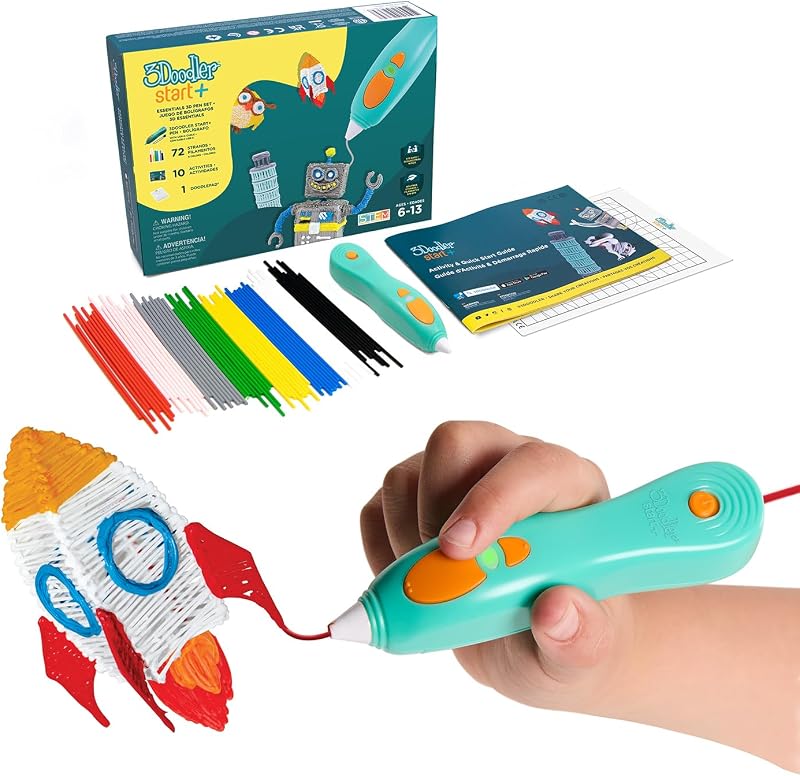
For parents looking specifically for younger creators, the 3Doodler Start+ Essentials 3D Pen is positioned as an easy-to-use educational STEM toy for boys and girls ages 6 and up. Unlike the high-heat nozzle of the MYNT3D Professional, the 3Doodler Start+ is designed for elementary-age learning from home, offering a lower-risk creative introduction for elementary students.
MIKA3D 32 Colors 3D Pen
Our score: 8.2/10
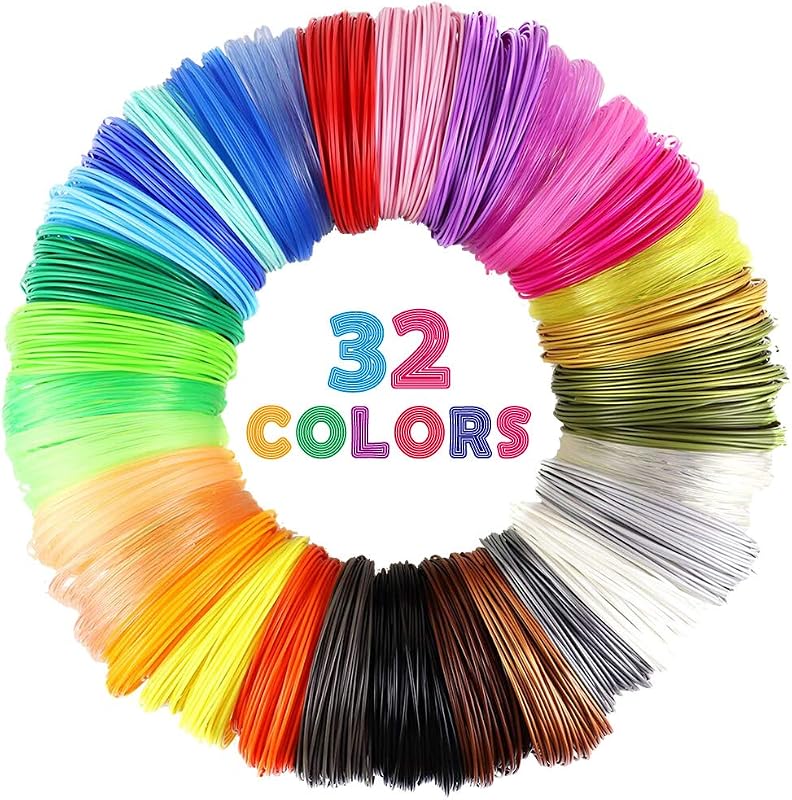
Rather than a competing stylus, the MIKA3D 32 Colors 3D Pen listing represents an essential material companion pack. It contains 32 individual colors of PLA filament refills measuring 10 feet per color for 320 feet total, along with 4 protective finger caps. Just as reliable kitchen appliances like kitchenaid kitchenaid professional mixers thrive on having the right supplies on hand, pairing a wide filament assortment with heat-resistant finger caps enhances both safety and creative variety during long crafting projects.
Final Verdict
This MYNT3D professional printing 3d pen review demonstrates that the stylus is built specifically for users who outgrow basic plastic-melting toys. By combining single-degree thermal increments, an informative OLED display, and a stepless extrusion slider, it gives the operator full command over plastic flow and bonding behavior. Whether executing high-temperature ABS repairs or drafting delicate PLA sculptures, the hardware reliably performs to maker standards.
So, is MYNT3D professional worth it for your household? If your family includes budding engineers, artistic teens, or DIY hobbyists who will respect the hot nozzle and leverage its granular adjustments, it stands as an outstanding investment in creative capability. Its combination of durable construction, safety certifications, and broad filament flexibility delivers lasting value across countless creative builds.
FAQ
What materials can the MYNT3D Professional 3D Pen extrude?
The pen is officially designed to support both PLA and ABS plastic filaments. Its thermal operating range from 140 to 230 C (and up to 240 C) accommodates the lower melting thresholds of PLA as well as the higher heat levels required for ABS.
How do you adjust temperature and speed on this pen?
Temperature is dialed in using buttons beside the OLED screen, which lets you raise or lower heat in single-degree increments. Extrusion speed is controlled separately using a continuous sliding feed switch located on the side of the stylus barrel.
Can young children use the MYNT3D Professional safely without help?
No, unsupervised use by young children is not advised. Because the extrusion nozzle reaches temperatures exceeding 200 C, direct parental guidance and basic safety precautions are necessary to prevent accidental burns.
Can the pen be powered by a portable power bank outdoors?
Yes, the listing notes that the device requires a 5V DC 2A input drawing 10 watts. Provided your portable power source meets these exact electrical requirements, the pen can be safely used outside standard indoor wall outlet locations.
What items are included inside the retail kit?
The package contains the ergonomic 3D pen, a 100-240V AC power adapter, 3 starter colors of plastic filament (with listings referencing PLA and ABS packs), and a 1-year limited warranty card.