As Amazon Associates, we earn from qualifying purchases. This means we may receive a small commission at no extra cost to you if you click through and make a purchase.
The Creality Falcon A1 10W enters the desktop fabrication market as a fully enclosed, pre-assembled crafting solution engineered specifically for tidy indoor spaces. Delivering an 80,000mW total machine output with CoreXY precision, it provides makers and households with an all-in-one platform capable of detailed cutting and high-resolution etching. Our assessment shows that this machine is an exceptionally practical, safety-focused tool that eliminates the usual mechanical hurdles associated with open-frame diode units.
This enclosed system is ideally suited for family crafters, home-based entrepreneurs, and design hobbyists who prioritize workspace cleanliness, physical eye protection, and rapid setup over infinite modular expansion. However, production shops requiring high-volume output or users intending to mark mirror-finish metals will need to consider specialized industrial alternatives instead.
Creality Falcon A1 10W at a Glance

| Feature | Specification |
|---|---|
| Safety Classification | Class 1 Laser System |
| Machine Power Output | 80W (80,000mW total machine output) |
| Laser Optical Output | 10W |
| Drive Architecture | CoreXY Motion System |
| Maximum Travel Speed | Up to 600mm/s |
| Engraving Precision | 0.05mm spot accuracy |
| Camera Integration | Built-in HD camera with auto-positioning and material recognition |
| Chassis Dimensions | 30 x 25 x 15 inches |
| Total Weight | 28.7 pounds |
| Enclosure Design | Fully enclosed, double-door access with transparent top and side panels |
| Honeycomb Compatibility | Strictly 460 x 346mm (18.11 x 13.62 inches) panels only |
| Included Software Support | Falcon Design Space, LightBurn, LaserGRBL |
Safety Enclosure and Indoor Crafting Environment
For home hobbyists and shared family craft spaces, laser safety is the primary consideration. The Creality Falcon A1 safety enclosure addresses this by wrapping the entire gantry inside a rigid housing certified as a Class 1 laser device. A Class 1 designation means the system is fully self-contained under normal operating conditions. The integrated transparent viewing surfaces filter 99% of laser light, protecting curious household members from stray optical radiation without forcing everyone in the room to wear heavy protective eyewear.
Beyond optical isolation, an enclosed system transforms the indoor air quality and acoustic footprint of your workspace. Burning natural fibers, plywoods, and treated hardwoods generates smoke, particulates, and resinous smells. The sealed frame contains processing fumes, channeling them through the exhaust system rather than letting them drift throughout the home. At the same time, the physical barrier dampens mechanical movement sounds, making long jobs far more tolerable in a living room, basement, or home office.
Material accessibility is another major structural strength. Rather than forcing you to reach awkwardly over open electronics, the chassis utilizes a double-door top lid combined with transparent side windows. These openings give you complete visibility over the cutting surface while facilitating the loading and unloading of raw blanks. When comparing enclosed designs to older open-frame units like the creality falcon 5w laser engraver, the physical shielding of the Falcon A1 makes it noticeably friendlier for shared spaces.
Motion System and Engraving Precision
Speed and motion stability determine how sharp fine text and miniature vector linework appear on finished projects. Under the hood, the Creality Falcon A1 10W specs reveal an advanced CoreXY motion platform capable of rapid vector acceleration up to 600mm/s. In a CoreXY arrangement, stationary stepper motors use synchronized belts to control the printhead along the X and Y axes, reducing the moving mass on the gantry. This reduction in carriage weight minimizes inertial vibration, allowing the laser to maintain an engraving accuracy of 0.05mm even during swift back-and-forth raster passes.
Intricate detailing on organic materials highlights the strengths of this motion system. During detailed Creality Falcon A1 wood engraving runs, the laser consistently delivers crisp edge definition, legible small-print typography, and clean shading gradients. Creality rates the machine with an 80W overall system power draw and a 10W laser module, providing sufficient beam intensity to vaporize thin wood layers swiftly without scorching the surrounding grain.
Users interested in marking treated or dark metals will find the machine capable of fine surface etching. However, the listing notes critical operational boundaries regarding reflective surfaces: the Falcon A1 is strictly prohibited from processing mirror-finished metals, mirrored acrylics, and related high-gloss items. Attempting to engrave reflective stock risks bouncing the beam directly back into the diode housing, which can crack the protective lens or degrade the diode prematurely.
Camera Positioning and Workflow Automation
Aligning irregular blanks manually often leads to wasted stock, misaligned graphics, and significant frustration. The Creality Falcon A1 camera positioning system directly solves this problem by using an overhead high-definition camera embedded in the lid. When the top door is closed, the camera takes an overhead snapshot of the honeycomb bed, projecting the real-time image directly into your workspace canvas.
Because the image shows the precise location, angle, and grain of the wood or leather blank, you can drag and drop your vector paths directly over the piece on your monitor. This visual placement eliminates the need to rely on repetitive mechanical frame-bounding tests. In addition to manual alignment, the software features smart material recognition, automatically identifying known material sheets and suggesting standard laser power and speed settings to reduce trial and error.
This automated workflow makes the Creality Falcon A1 for beginners remarkably straightforward compared to unassisted DIY diode platforms. Instead of memorizing test matrices and burn depths for routine wood cuts, users can place their blank, confirm the visual placement on screen, and begin the run. For crafters graduating from manual setups like an earlier falcon laser engraver, the integrated optical assist saves hours of setup time across weekly projects.
Out-of-the-Box Assembly and Software Compatibility
One of the most persistent complaints about entry-level laser tools is the extensive assembly process. Traditional kits require sorting through dozens of bolts, aligning aluminum v-slot rails, and tensioning rubber belts before making a single cut. The Falcon A1 arrives completely pre-assembled from the factory. You pull the 28.7-pound chassis from the packaging, connect the necessary cables, verify the bed placement, and start your initial configuration within minutes.
Flexibility across diverse operating systems depends on reliable driver and program support. Creality Falcon A1 software compatibility includes both proprietary and industry-standard applications:
- Falcon Design Space: Creality’s exclusive native design software tailored for beginners, complete with real-time job monitoring and automated material profiles.
- LightBurn: The industry-standard laser control software for advanced hobbyists seeking multi-layer toolpaths, power ramping, and custom vector offsets.
- LaserGRBL: A reliable, lightweight open-source program popular among Windows users handling straightforward vector lines and bitmap engraving.
While the machine is easy to operate out of the box, shoppers must verify workspace dimensions and accessory limits before buying. The chassis measures 30 x 25 x 15 inches, requiring a sturdy table or dedicated workbench. Furthermore, the manufacturer explicitly states that the Falcon A1 is only compatible with 460 x 346mm (18.11 x 13.62 inch) honeycomb panels. Attempting to fit odd-sized accessories into the lower bay will prevent the doors from latching properly.
Long-Term Value and Construction Quality
Evaluating this Creality Falcon A1 laser cutter review requires looking past convenience to determine long-term durability. The fully enclosed frame acts as a defensive shell against workshop debris. In open-gantry models, ambient sawdust settles onto lubricated guide rails, turning into abrasive sludge that causes belt slippage and stepped layer lines. By isolating the mechanical rails inside a filtered compartment, internal components stay cleaner over months of repetitive cutting.
Is Creality Falcon A1 worth it for a busy family craft environment? The answer largely depends on how much you value pre-configured safety. While open-frame diode setups like the larger creality falcon 2 offer expansive cutting spaces, they demand external enclosures, safety goggles, and custom fume routing to match what the A1 provides natively. The unified construction of the Falcon A1 avoids extra peripheral purchases and minimizes tinkering.
The primary compromise is modularity. Because the enclosure forms an integral part of the machine structure, you cannot install riser legs to engrave oversized items like wooden crates or tall luggage. The 460 x 346mm bed footprint is fixed, meaning projects must fit inside the internal dimensions. For users who work primarily on signs, personalized gifts, ornaments, leather patches, and flat craft sheets, this bounded area provides ample creative real estate.
Creality Falcon A1 10W Pros and Cons
Pros
- Class 1 fully enclosed protective chassis
- Completely pre-assembled out of the box
- HD camera with auto material recognition
- High-speed 600mm/s CoreXY motion platform
- Convenient double-door access and side windows
Cons
- Strictly prohibited from engraving reflective metals
- Bed limited to 460 x 346mm honeycomb panels
- Large desktop footprint at 30 x 25 inches
Who Should Buy the Creality Falcon A1 10W
Buy It If
- You need a Class 1 fully enclosed machine that protects eyes, contains burning odors, and keeps moving parts away from kids and pets.
- You want a completely pre-assembled unit that functions out of the box without building frames, routing cables, or tensioning belts.
- You value camera-assisted auto-positioning to prevent misaligned cuts on expensive personalized blanks and small craft items.
- You plan to use LightBurn, LaserGRBL, or the beginner-oriented Falcon Design Space suite interchangeably.
Skip It If
- You regularly engrave tall, bulky, or curved items that require riser blocks, open-bottom frames, or rotary attachments beyond the internal bay height.
- You want to engrave highly reflective stock like mirror-finished metals or mirrored acrylics, which are strictly prohibited.
- You require an ultra-compact, portable tool that can be easily folded up and slipped into a standard bookshelf between sessions.
Creality Falcon A1 10W Alternatives Worth a Look
If the physical dimensions, internal working bounds, or power configuration of the Falcon A1 do not quite match your workshop needs, several alternative options exist across different price points and capability levels.
xTool M2 10W Laser Engraver
Our score: 8.0/10

The xTool M2 10W Laser Engraver serves as a direct market competitor built around an enclosed, family-friendly footprint. When comparing the Creality Falcon A1 vs xTool M2, both machines prioritize Class 1 enclosure safety and internal smoke containment for processing materials like wood, leather, felt, fabric, and paper. The xTool M2 listing highlights built-in dual cameras for visual monitoring and alignment, making it an appealing option for crafters who prefer a multi-camera perspective when setting up their DIY crafts.
130 x 130mm Working Area
Our score: 8.2/10

For hobbyists with extremely constrained desktop space, the 130 x 130mm Working Area machine (the ACMER S1) provides a compact desktop design. Featuring a 2500mW laser module, this miniature cutter is designed strictly for small DIY crafts, miniature wooden signs, and light acrylic detailing. Crafters who live in small apartments and do not need the large 460 x 346mm bed or the 10W optical punch of the Falcon A1 will appreciate the smaller, lightweight footprint of this unit.
Laser Cutter
Our score: 9.2/10
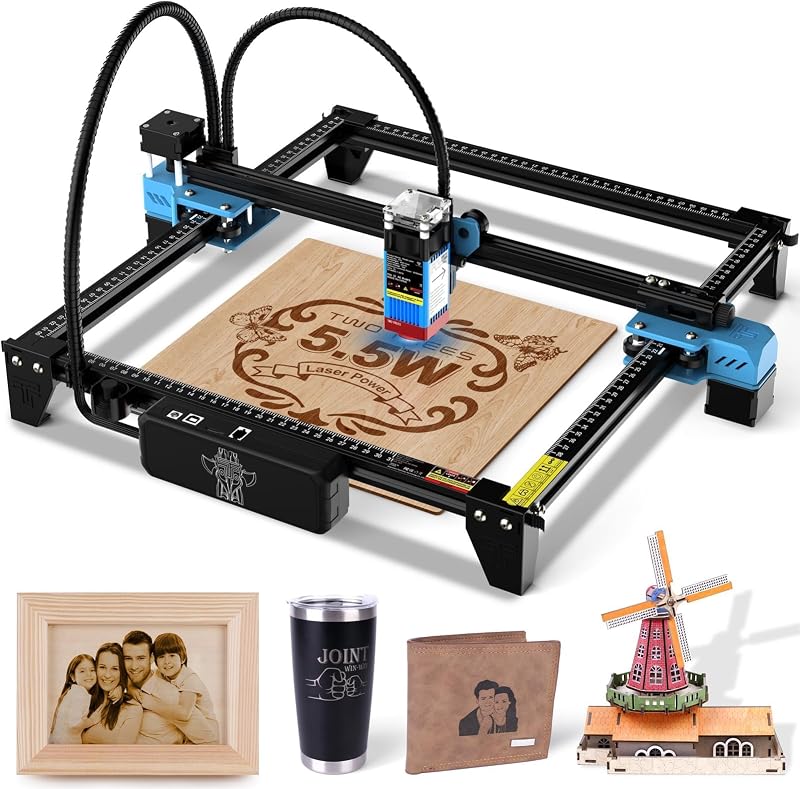
Makers searching for an open-frame budget tool should consider the Laser Cutter known as the Twotrees TTS-55 Pro. This unit features a 300 x 300 mm work area, a 0.08mm laser spot, and a 5500mW laser output module capable of working on wood, metal, acrylic, glass, and stainless steel. It lacks the Class 1 protective enclosure and integrated overhead camera of the Falcon A1, making it better suited for dedicated garage tinkerers who already own protective safety goggles and ventilation equipment.
Final Verdict
The Creality Falcon A1 10W establishes a sensible middle ground for makers who want serious diode laser cutting power without turning their crafting room into a noisy, smoke-filled fabrication workshop. By coupling an 80W system draw and 10W optical output with a factory-built Class 1 enclosure, 600mm/s CoreXY mechanics, and an integrated HD camera, Creality has addressed the most common pain points of desktop laser ownership. The transparent panels filter 99% of laser light, giving families peace of mind while watching projects come to life.
Its strict honeycomb dimensions and firm prohibition against mirror-finished reflective stock are clear boundaries, but they in no way diminish its core value. For engraving detailed wood signs, cutting personalized leather, and personalizing household goods, the Falcon A1 delivers dependable, zero-assembly performance. If your goal is to unbox a capable laser engraver, plug it into your computer, and produce accurate projects with minimal mechanical setup, the Falcon A1 represents a sound, durable investment for your creative workspace.
FAQ
Does the Creality Falcon A1 10W require assembly?
No, the Falcon A1 arrives completely pre-assembled from the manufacturer. You do not need to assemble aluminum extrusions, run wiring harnesses, or balance gantry rails. Once removed from the shipping box, you only need to connect the power and data cables, position the bed, and connect your computer software to begin the initial setup.
Can the Creality Falcon A1 engrave reflective metals or mirrors?
No. The manufacturer explicitly states that the Falcon A1 is strictly prohibited from engraving highly reflective materials, including mirror-finished metals and mirrored acrylic. Laser light reflecting off these glossy surfaces can bounce back into the optical lens assembly, causing permanent thermal damage to the laser module.
Which honeycomb panels fit inside the Falcon A1?
The listing explicitly notes that the Falcon A1 is only compatible with 460 x 346mm (18.11 x 13.62 inches) honeycomb panels. Standard third-party panels of differing dimensions will not sit properly within the designated mounting area and may obstruct the double-door enclosure.
What software works with the Creality Falcon A1 10W?
The machine is compatible with three primary programs: Creality’s proprietary Falcon Design Space software, LightBurn, and LaserGRBL. Falcon Design Space is optimized for beginners with real-time job monitoring and automatic material recognition, while LightBurn offers professional vector editing and layer management.
Does the Creality Falcon A1 require wearing protective safety glasses?
The Falcon A1 is classified as a Class 1 laser device featuring a fully enclosed frame with protective panels that block 99% of laser light. According to the manufacturer, this enclosure shields users from stray beams during normal closed-door operation, meaning you do not need to wear safety goggles while monitoring work through the transparent viewing panels.