As Amazon Associates, we earn from qualifying purchases. This means we may receive a small commission at no extra cost to you if you click through and make a purchase.
Finding a dependable print surface is one of the most practical upgrades you can make for consistent 3D printing results, and the Creality Ender 3 S1 Pro Build Plate delivers reliable first-layer stick alongside painless print release. Designed as a direct factory replacement, this flexible spring steel sheet pairs with a strong magnetic sticker base to solve the common frustration of prints refusing to let go after cooling. For hobbyists, students, and home makers seeking smooth operation without damaged models, our verdict is that this build plate provides a dependable, stress-free foundation that elevates everyday printing reliability.
This replacement surface ideally suits busy households, makerspaces, and home hobbyists who run back-to-back print jobs and want to avoid scraping tools that can gouge surfaces or cause accidental finger slips. Families printing functional household items, school STEM projects, and tabletop figures will appreciate the straightforward flex-and-pop removal process. However, high-temperature industrial specialists regularly operating heated beds well above 70°C for advanced materials will need to look elsewhere, as the manufacturer rates the included magnetic adhesive base specifically for bed temperatures up to that threshold.
Creality Ender 3 S1 Pro Build Plate at a Glance

| Attribute | Detail |
|---|---|
| Manufacturer | Creality 3D |
| Model Number | 3D-PEI 235-3S1 Black |
| Listed Color | Black-3S1 Original PC bed |
| Plate Dimensions | 235 x 235 mm (Package: 10.43 x 9.84 x 0.51 inches) |
| Total Item Weight | 1.17 pounds |
| Build Material | High-quality flexible spring steel sheet |
| Magnetic Base Heat Resistance | Up to 70°C long-term heated bed temperature |
| Compatible Filaments | PLA, PETG, ABS, PEEK, and similar materials |
| Printer Compatibility | Ender 3 S1, S1 Pro, V3 SE, V3 KE, V3, CR-10 SE, Ender 5 S1, Ender 3 Series (235x235mm) |
Spring Steel Flexibility and Easy Part Removal
The primary attraction of a dedicated ender 3 s1 pro bed replacement lies in how easily finished models separate from the build surface once a print completes. Traditional glass beds or rigid aluminum plates often turn model removal into a chore, forcing users to wedge metal spatulas underneath delicate prints and risking both the model and the surface. The creality ender 3 s1 pro spring steel bed eliminates that struggle entirely through high-grade spring steel that flexes smoothly in both directions without taking on a permanent bend.
When your print finishes, you simply pull the plate off its magnetic base, hold both edges, and bend it gently. The elasticity of the metal breaks the adhesion seal cleanly beneath the printed object, popping models free within seconds. Creality engineered this specific plate to maintain its structural memory across repeated bending cycles, meaning it will not warp, crease, or lose its flat profile over prolonged family workshop use. Removing prints without sharp scrapers also keeps hands and fingers safe, making it a welcoming option for households where younger makers assist with hobby projects.
Beyond convenience, tool-free part removal preserves the fine dimensional accuracy of thin-walled prints, miniature bases, and threaded screw parts that would otherwise snap under spatula pressure. Instead of struggling against aggressive bed adhesion or waiting hours for complete thermal contraction, you can quickly clear the platform, snap the sheet back onto the printer, and start your next queued print file immediately.
Magnetic Adhesion and Thermal Bed Stability
A flexible sheet is only as dependable as the base beneath it, and the creality ender 3 s1 pro magnetic build surface focuses heavily on rock-solid bed stability. The included soft magnetic sticker adheres directly to your printer heated aluminum carriage, providing continuous magnetic attraction across the full build area. This strong pull prevents the sheet from shifting or sliding sideways during high-acceleration print runs, ensuring that rapid toolhead movements do not induce layer shifts on tall prints.
Safety and ergonomics stand out in the mechanical layout of the plate. Creality incorporated dual front-facing tabs that act as pull handles, allowing you to lift the plate away from the heated aluminum bed without touching hot metal surfaces directly. Rounded R-angle corners eliminate sharp burrs along the perimeter, preventing scratches to your hands or print cables. Additionally, pre-cut rear positioning notches align instantly with the alignment screws found on printers like the creality ender 3 v3 se, ensuring the plate drops into the exact same location every single print run.
Thermal transmission through the spring steel is even and steady, allowing bed heat to reach the build face uniformly. Creality specifies that the soft magnetic sticker is rated to withstand a long time of continuous work with the heated bed at temperatures up to 70°C. Maintaining print temperatures within this range keeps the magnetic backing firm and resilient over years of consistent family crafting and hobby printing.
Filament Compatibility and Print Surface Adhesion
Whether you are creating practical storage containers or artistic toys, material flexibility matters. The creality ender 3 s1 pro pei sheet setup accommodates a broad selection of consumer filaments, including PLA, PETG, ABS, and PEEK as noted by the manufacturer. The textured surface finish provides micro-mechanical grip during the critical first layer, preventing edge lifting and curling corners on wide-footprint prints without requiring messy glue sticks or spray adhesives.
Evaluating the creality ender 3 s1 pro specs reveals that its universal 235x235mm square profile matches an extensive ecosystem of machines. If you operate multiple printers in your home or makerspace, such as an Ender 3 S1, an Ender 3 V3, or a creality ender 5 s1, this single plate design functions seamlessly across them all. Standardizing your workspace on this creality 235x235mm build plate streamlines routine slicer profiles because first-layer squish and surface grip remain identical across different beds.
PLA and PETG adhere firmly while the bed remains heated, locking down delicate support structures and small perimeter lines with precision. Once the heated platform cools back down toward room temperature, the natural contraction between the plastic and the textured surface begins breaking the vacuum bond naturally. For standard filament projects, models often release with minimal manual bending, keeping the bottom surface cleanly textured and ready for immediate presentation.
Everyday Value and Setup for Family Makers
When deciding whether is creality ender 3 s1 pro plate worth it, long-term durability and ease of maintenance are the deciding factors. Cheaper aftermarket adhesive sheets often peel away at the edges, bubble in the center after repeated heat cycles, or tear when printing sticky filaments like PETG. Because this build plate relies on genuine spring steel, it resists thermal fatigue and physical abuse far better than basic plastic film coverings, protecting your investment across thousands of operating hours.
The straightforward installation makes the creality ender 3 s1 pro for beginners a painless first hardware upgrade. If you already own an S1 Pro or similar modern printer, the plate snaps directly onto your existing magnetic platform with zero calibration changes required beyond a fast auto-bed leveling pass. If you are upgrading an older unit like a classic creality ender 3 pro, applying the included magnetic sticker to the clean aluminum bed instantly modernizes the printer workflow without complex wiring or structural modifications.
Creality backs the plate with dedicated customer support intended to address operational questions within 24 hours. Routine upkeep is minimal: keeping the textured surface free from finger oils requires only an occasional wipe with isopropyl alcohol or warm, soapy water. By eliminating spatulas, scrapes, and bed alignment drift, the plate reduces failed prints and saves valuable filament, delivering noticeable ongoing value for busy household makers.
Creality Ender 3 S1 Pro Build Plate Pros and Cons
Pros
- Flexible spring steel pops prints off without scrapers
- Dual handles prevent burns when removing plate
- Pre-cut positioning holes ensure quick bed alignment
- Strong magnetic sticker keeps sheet stable during printing
- Compatible across numerous popular 235x235mm Creality printers
Cons
- Magnetic sticker rated for temperatures up to 70°C
- Not sized for large-format 3D printer beds
- Textured finish leaves mechanical pattern on print base
Who Should Buy the Creality Ender 3 S1 Pro Build Plate
Buy It If
- You want effortless, scraper-free model removal that protects your prints and keeps fingers safe from sharp tools.
- You own an Ender 3 S1, S1 Pro, V3 SE, Ender 5 S1, or any standard 235x235mm Creality bed and need an exact factory drop-in fit.
- You primarily print with PLA, PETG, or standard craft filaments that run within the magnetic base 70°C comfort rating.
- You value durable spring steel that snaps back flat without creasing or warping after repeated daily bending.
Skip It If
- You routinely print engineering filaments that demand prolonged heated bed temperatures above 70°C.
- Your 3D printer uses an unconventional bed size that cannot accommodate standard 235x235mm build plate dimensions.
- You prefer an ultra-smooth, mirror-glass bottom finish rather than a textured mechanical base profile.
Creality Ender 3 S1 Pro Build Plate Alternatives Worth a Look
If you are exploring broader printer upgrades or require an entirely self-contained ecosystem instead of a single replacement build plate, several alternative hardware paths on the market are worth considering.
MakerWorld Model Library
Our score: 8.4/10

The MakerWorld Model Library package represents a complete machine upgrade featuring the Bambu Lab P1S Combo with an AMS unit for automated multi-color 3D printing. It incorporates high-speed CoreXY mechanics and automated bed leveling inside an enclosed chamber. Shoppers who want a brand-new multi-color printing ecosystem rather than refreshing their current Creality bed plate should look here.
FLASHFORGE Adventurer 5M 3D Printer
Our score: 8.4/10

The FLASHFORGE Adventurer 5M 3D Printer is a standalone CoreXY 3D printer offering fully auto-leveling, printing speeds up to 600mm/s, and a 280°C direct extruder with a 3-second detachable nozzle. It provides a compact 220x220x220mm build volume. Hobbyists seeking an entirely new high-speed printer instead of maintaining an existing 235x235mm machine platform will find it an intriguing option.
Beginner-Friendly Ecosystem with MakerWorld Model
Our score: 8.8/10
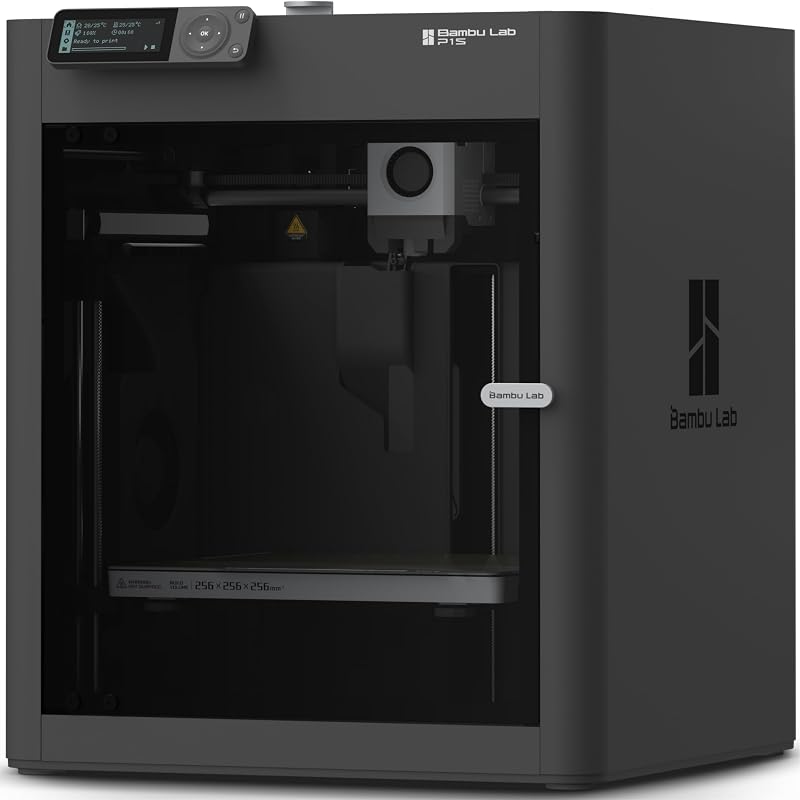
The Beginner-Friendly Ecosystem with MakerWorld Model features the enclosed CoreXY Bambu Lab P1S 3D Printer engineered for high-speed, ready-to-use precision out of the box. Users who prefer transitioning to an integrated, pre-assembled enclosed machine rather than maintaining individual components on their open-frame bed will appreciate this direction.
Final Verdict
The Creality Ender 3 S1 Pro Build Plate is a practical, well-engineered solution that directly solves the everyday annoyances of bed leveling adhesion and stubborn print extraction. Its combination of durable spring steel, safe dual pull handles, positioning holes, and a dependable magnetic base makes running regular 3D print jobs far smoother and significantly safer for household workshops. By replacing stubborn scrapers with a gentle two-handed flex, it protects both your hands and your completed models from damage.
While users with specialized high-temperature filament setups will need to watch the 70°C rating on the magnetic base, it represents an outstanding upgrade for standard family projects, functional prints, and STEM builds. If your current print surface is gouged, warped, or frustrating to clear, this official Creality replacement restores reliable first-layer consistency and delivers enduring value across every spool you print.
FAQ
Which 3D printers are compatible with this build plate?
The build plate measures 235x235mm and fits the Ender 3 S1, Ender 3 S1 Pro, Ender 3 V3 SE, Ender 3 V3 KE, Ender 3 V3, CR-10 SE, Ender 5 S1, standard Ender 3 Series printers, and other models featuring a matching 235x235mm heated bed platform.
How do you release printed parts from the surface?
Once printing finishes, lift the plate off the magnetic base using the integrated front handles and gently flex the spring steel sheet from both sides. The bending motion breaks the bottom adhesion bond, popping the model free without requiring scrapers or blades.
What is the maximum recommended bed temperature for the magnetic base?
Creality lists the soft magnetic sticker to withstand continuous work with the heated bed at a temperature of up to 70°C, which covers typical bed settings for common filaments like PLA and standard PETG blends.
Do you need tools or spatulas to detach models from this bed?
No tools are needed. The elasticity of the spring steel allows you to remove models simply by flexing the plate by hand, protecting the surface coating from spatula scratches and keeping family workspaces safer.
Does the plate come with positioning aids for quick alignment?
Yes, the plate features pre-cut positioning holes designed to align with matching screws on compatible Creality heated beds, alongside an R-angle curved edge design and dual handles for secure, burn-free handling.


