As Amazon Associates, we earn from qualifying purchases. This means we may receive a small commission at no extra cost to you if you click through and make a purchase.
Traveling with a family often means managing a chaotic collection of smartphones, tablets, e-readers, gaming devices, and streaming sticks, all competing for a stable wireless signal. The TP-Link Roam 6, also cataloged as the TL-WR1502X, enters the scene as a specialized portable Wi-Fi 6 router engineered to replace that frustration with a single, private wireless environment. By linking to an external network and broadcasting your own secure local network, this pocket-sized device simplifies travel logistics and provides families with reliable connectivity on the move.
This compact networking hub is an exceptional match for family vacationers, frequent hotel guests, and remote professionals who want consistent device management, modern WPA3 protection, and built-in VPN functionality without having to register dozens of devices on public landing pages. Conversely, if you are seeking a standalone cellular hotspot that accepts its own SIM card, or if you need a permanent multi-room mesh network to blanket an entire multi-story residence, this travel-oriented router will not meet those specific needs.
TP-Link Roam 6 at a Glance

| Attribute | Specification Details |
|---|---|
| Wireless Generation | Wi-Fi 6 (802.11ax) |
| Data Transfer Rate | Up to 1500 Mbps (1201 Mbps on 5 GHz, 300 Mbps on 2.4 GHz) |
| Network Security Protocols | WPA-PSK, WPA2-Enterprise, WPA3 |
| Physical Ethernet Ports | 2 Gigabit Ports (10/100/1000 Mbps) |
| Additional Interfaces | 1 USB 2.0 Port, 1 USB-C Power Port |
| Operating Modes | Router Mode, Hotspot Mode, AP / RE / Client Mode |
| Antenna Configuration | 2 Internal Antennas |
| Physical Dimensions | 4.09 in. × 3.54 in. × 1.10 in. |
| Power Requirements | Type-C Power Supply (Included adapter or 5V/3A PD power source) |
| Firmware Platform | Proprietary networking operating system (No OpenWrt support) |
Travel Network Security and Private Browsing
Connecting family devices directly to unprotected hotel, resort, or airport Wi-Fi carries inherent security vulnerabilities. Public wireless environments often lack basic device isolation, leaving open laptops and phones exposed to snooping on shared local networks. In this tp-link roam 6 review, security stands out as the unit’s primary strength. The router acts as an intermediary barrier between the open internet and your family’s personal tech. By broadcasting its own private network guarded by WPA-PSK, WPA2-Enterprise, or modern WPA3 encryption, unauthorized users on the venue’s public network cannot easily interact with your family’s connected gadgets.
For parents who must manage work duties while traveling, tp-link travel router vpn integration is a standout feature. The device allows travelers to establish secure remote work tunnels directly at the router level. Rather than configuring and launching individual VPN software clients across multiple laptops and mobile phones, traffic passing through the router can be shielded collectively. Whether you are reviewing bank accounts, handling business correspondence, or coordinating a work setup alongside portable conference gear like an insta 360 link 2c pro, the router isolates your activities from the broader shared public access point.
Furthermore, because your devices communicate exclusively with your portable router, their network identities remain hidden behind its firewall. This setup prevents local network visibility across open guest environments, stopping external attempts to discover shared folders or cast feeds accidentally. For security-minded families, creating an isolated digital sanctuary in a strange hotel room makes traveling with tech significantly less stressful.
Versatile Operating Modes and Simplified Setup
The practical value of any travel router hinges on how easily it adapts to varied lodging infrastructures, and the tp link roam 6 setup shines due to its multi-mode design. The device features three primary operating modes: Router Mode, Hotspot Mode, and Access Point/Range Extender/Client Mode. In traditional Router Mode, you can plug an Ethernet cord directly from the hotel wall into the unit’s Gigabit WAN port, generating an instant, pristine private Wi-Fi network that bypasses wireless congestion in the building entirely.
When wired Ethernet is unavailable, Hotspot Mode—often referred to in networking as WISP mode—becomes the primary tool for travelers. In this configuration, the router connects wirelessly to the hotel or airport public Wi-Fi network and shares that single connection with all your personal devices. This functionality makes it a standout portable wifi 6 router for hotels because it completely eliminates the chore of navigating captive portal splash screens on every single tablet, e-reader, and streaming stick. You simply authenticate the hotel’s agreement page once using a single smartphone, and every other device paired with your private SSID instantly gains internet access without individual logins.
Beyond standard internet distribution, the hardware provides flexible USB tethering options. If a rental property experiences an unexpected broadband outage, travelers can tether a compatible smartphone via the onboard USB 2.0 port to distribute mobile cellular data to family laptops and tablets. The unit also supports AP, Range Extender, and Client modes, allowing you to add wireless capability to wired equipment or expand existing coverage in larger vacation rentals. Management is handled smoothly through a proprietary networking operating system utilizing an app or remote control method, keeping maintenance straightforward even for non-technical users.
Wi-Fi 6 Performance and Handling Multiple Family Devices
Modern family vacations place heavy demands on travel bandwidth. While parents participate in remote work conferences or stream evening movies, children are frequently gaming, browsing media, or downloading offline playlists. Based on the tp link roam 6 specs, the unit delivers dual-band 802.11ax Wi-Fi 6 connectivity, offering speeds up to 1201 Mbps on the 5 GHz band and 300 Mbps on the 2.4 GHz band for an aggregate 1500 Mbps throughput capacity. Wi-Fi 6 technology provides significantly improved capacity and efficiency over legacy standards, minimizing lag and buffering when multiple hardware units are active at the same moment.
Because the router features two internal antennas and an optimized modern CPU, it manages simultaneous wireless streams far more gracefully than older travel routers. While actual wireless throughput will always be bottlenecked by the venue’s incoming internet speed, the local communication between your hardware and the router remains fast and responsive. Activities like casting local home video footage or backing up family vacation photos to a connected drive move fluidly across the local 5 GHz channel.
The integration of two Gigabit ports (supporting 10/100/1000 Mbps speeds) also means that bandwidth-sensitive hardware does not need to rely solely on wireless transmission. If a family member brings a portable console or gaming laptop that benefits from minimal latency, plugging directly into the LAN port provides rock-solid performance. For families familiar with maintaining seamless performance across larger homes using dedicated extenders like the tp link ax3000, having robust dual-band Wi-Fi 6 performance packaged inside a pocketable chassis offers a very welcome travel upgrade.
Compact Form Factor and Power Flexibility
Bulky equipment quickly becomes a burden when packing family luggage, which makes the physical design of the tp link roam 6 for travel particularly appealing. Measuring just 4.09 inches long, 3.54 inches wide, and 1.10 inches thick, the device slips effortlessly into the corner of a backpack, diaper bag, or carry-on suitcase. Despite its compact footprint, the plastic casing is built for durability on the move, housing internal antennas that will not snap or twist off inside tightly packed bags.
Power flexibility is another massive convenience for family travel. The unit features a modern USB-C power port and operates via the included wall adapter or any standard 5V/3A Power Delivery (PD) power source, such as a portable battery bank. This capability means you do not have to hunt for an open AC wall outlet right next to a hotel desk. You can place the router on a windowsill or luggage rack powered entirely by a power bank to catch the best possible public Wi-Fi signal.
Additionally, the integrated USB 2.0 port serves dual purposes beyond smartphone cellular tethering. It can also be utilized for local external storage sharing. By plugging in a compact flash drive, family members can access a centralized repository of road-trip movies, audiobooks, and documents without needing internet access. While the USB interface is limited to USB 2.0 transfer speeds rather than newer USB 3.0 standards, it remains perfectly adequate for media playback and essential document retrieval during long layovers or car trips.
TP-Link Roam 6 Pros and Cons
Pros
- Fast Wi-Fi 6 speeds up to 1500 Mbps
- Pocket-sized build fits easily in carry-on bags
- Operates using standard 5V/3A PD power banks
- Dual Gigabit ports for fast wired connections
- Hotspot mode bypasses repetitive hotel portal logins
- Integrated VPN support for secure public browsing
Cons
- No internal cellular SIM card slot
- Does not support OpenWrt custom firmware
- Local USB file sharing uses USB 2.0
Who Should Buy the TP-Link Roam 6
Deciding whether the tp link tl-wr1502x fits your upcoming itinerary depends entirely on how you travel and the kinds of hardware your family carries.
Buy It If
- You regularly travel with multiple family devices and dread entering captive portal passwords on every tablet and streaming stick individually.
- You require robust network security, modern WPA3 protection, and router-level VPN connectivity while accessing public lodging networks.
- You prioritize flexible power options and want the ability to run your travel router off a standard 5V/3A PD power bank.
- You need physical Gigabit Ethernet ports for low-latency gaming, streaming, or wired hotel room wall jacks.
Skip It If
- You need a standalone cellular hotspot that operates independently using an integrated SIM card slot.
- You are looking for third-party open-source firmware compatibility, as this specific model does not support OpenWrt.
- You need to cover an entire multi-story residence with seamless mesh coverage rather than a compact travel space.
TP-Link Roam 6 Alternatives Worth a Look
If your primary networking concern revolves around outfitting a large, permanent family home with comprehensive multi-room coverage rather than carrying a pocket-sized router on vacation, consider these dedicated whole-home mesh options instead.
Covers up to 6500 Sq.Ft.
Our score: 9.6/10
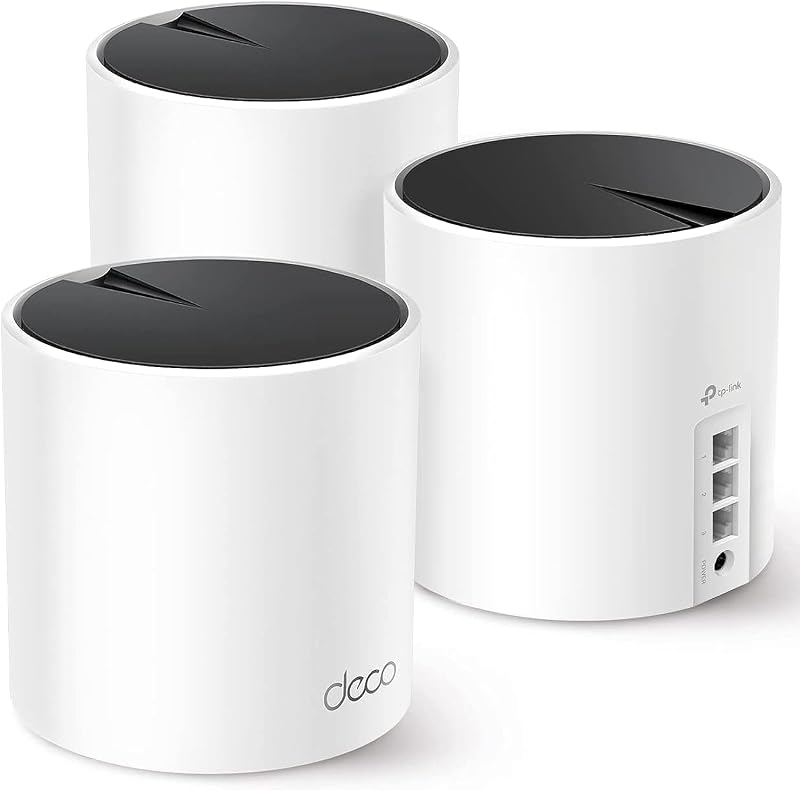
The Covers up to 6500 Sq.Ft. Deco X55 AX3000 mesh package is designed specifically to replace traditional standalone routers and range extenders across expansive residences. Featuring three units per pack, each equipped with three Gigabit ports and supporting wired Ethernet backhaul, this system delivers steady Wi-Fi 6 coverage across up to 6500 square feet, making it an ideal permanent installation for busy households.
Up to 6,600 Sq.Ft
Our score: 8.8/10

For technology-forward families wanting to jump directly into next-generation networking, the Up to 6,600 Sq.Ft Deco BE25 dual-band system offers cutting-edge Wi-Fi 7 capabilities. Delivering speeds up to 5 Gbps across a 240 MHz bandwidth, this 3-pack features dual 2.5G wired backhaul ports, Multi-Link Operation (MLO), AI-Roaming, and HomeShield security. It suits households running high-demand smart home ecosystems that outgrow standard travel equipment, complementing advanced home networking hardware like the tp link axe5400.
Wi-Fi up to 7200 Sq.Ft
Our score: 9.4/10

If your home experiences heavy wireless interference and demands broad multi-band coverage, the Wi-Fi up to 7200 Sq.Ft Deco XE75 AXE5400 tri-band setup provides a significant step up. Utilizing the clear 6 GHz frequency band alongside 5 GHz and 2.4 GHz channels, this system eliminates neighborhood congestion and replaces traditional extenders across properties up to 7200 square feet. Readers exploring high-bandwidth multi-node setups like the deco xe75 pro will find this full-scale solution far better tailored to domestic living than a travel router.
Final Verdict
When asking yourself is tp link roam 6 worth it, the answer comes down to convenience and digital protection away from home. The TP-Link Roam 6 successfully consolidates family travel networking into an unobtrusive, pocket-friendly package. By combining Wi-Fi 6 speeds, multi-mode flexibility, simple USB-C power compatibility, and robust WPA3/VPN encryption, it eliminates the common headaches of hotel captive portals and unsecured public networks.
While power users will notice the lack of OpenWrt support and the absence of a built-in cellular SIM slot, these design choices keep operation streamlined and accessible for family travelers. If you want a dependable, easily managed travel router that keeps your family’s phones, laptops, and streaming gadgets secure and connected on every vacation, the Roam 6 is an outstanding piece of travel gear.
FAQ
Does the TP-Link Roam 6 function as a standalone cellular hotspot?
No, the TP-Link Roam 6 is not a Mi-Fi device or independent mobile hotspot, and it does not contain an internal cellular modem or SIM card slot. However, it can share cellular data if you connect a compatible smartphone to its USB 2.0 port using phone tethering mode.
Can I install custom OpenWrt firmware on the TP-Link Roam 6?
No, the manufacturer explicitly notes that this model does not support OpenWrt. It runs on TP-Link’s proprietary networking operating system, which is managed via an app or remote interface.
How does Hotspot Mode help with hotel splash screens?
In Hotspot Mode, the router connects directly to the hotel’s wireless network. You log into the hotel’s captive portal agreement page just once using a single smartphone or laptop browser. Once accepted, all other family devices connected to your private Roam 6 Wi-Fi network gain instant internet access without needing to authenticate individually.
Can the TP-Link Roam 6 be powered by a portable power bank?
Yes, the router features a standard USB-C power port. In addition to the included power adapter, it can be operated using any standard 5V/3A Power Delivery (PD) power source, including compatible portable battery banks.
What physical ports are included on the TP-Link Roam 6?
The device includes two 10/100/1000 Mbps Gigabit Ethernet ports (one LAN and one WAN/LAN), one USB 2.0 port for phone tethering and external storage sharing, and one dedicated USB-C port for power delivery.