As Amazon Associates, we earn from qualifying purchases. This means we may receive a small commission at no extra cost to you if you click through and make a purchase.
The Lutron Caseta Smart Bridge serves as the central hardware communication gateway for Lutron’s wireless lighting controls, motorized Serena shades, and connected home ecosystem. Rather than forcing every smart switch in your home to connect independently to your wireless router, this compact device plugs into your network and coordinates all Caseta components on a dedicated wireless frequency. Our research into the hardware specifications, listing data, and intended operational profile reveals an exceptionally dependable hub that eliminates the connectivity drops, latency, and router congestion common to entry-level smart home gear. For homeowners seeking an uncompromisingly stable foundation for automated wall switches and smart shades, this bridge delivers set-and-forget performance that simply works every time someone taps a switch or issues a voice command.
This system suits busy families, multi-user households, and homeowners who prioritize day-in, day-out reliability over endless software tweaking. Because it integrates natively with every major voice assistant and mobile platform, it fits homes where family members use a mix of Apple iPhones, Android devices, and smart speakers. Conversely, users looking for an open-ended DIY automation controller to manage generic Zigbee sensors or direct third-party smart bulbs should look elsewhere. The bridge is specifically designed to manage the Caseta ecosystem, meaning those who do not plan to install Caseta switches or Serena shades will find little utility in this dedicated piece of hardware.
Lutron Caseta Smart Bridge at a Glance
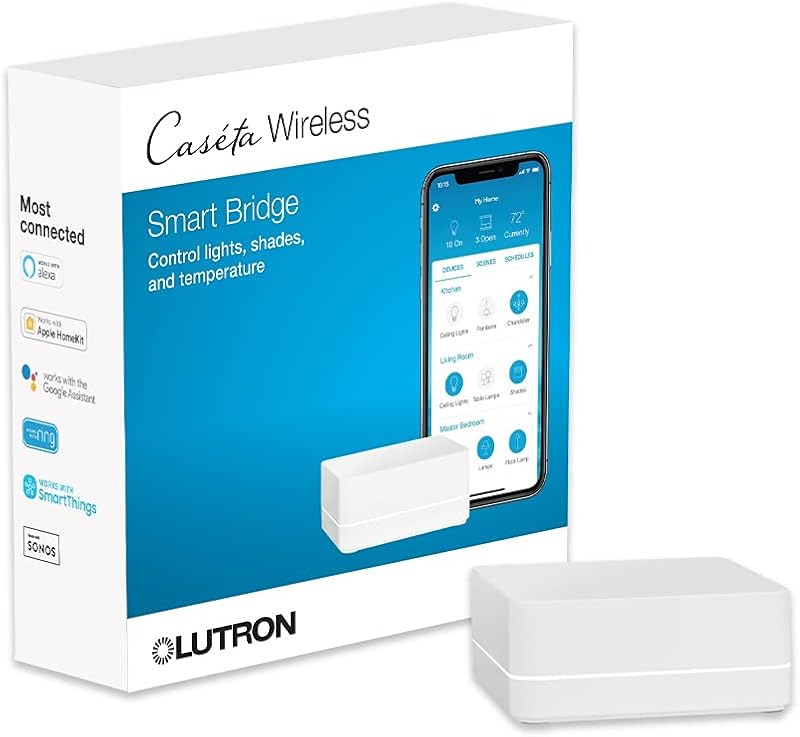
| Feature | Specification |
|---|---|
| Device Capacity | Supports up to 75 Caseta devices |
| Wireless Technology | Lutron Clear Connect Technology |
| Operating Voltage | 120 volts |
| Current Rating | 0.3 A |
| Operating Temperature | 32 °F to 104 °F |
| Connector Type | Plug in |
| Controller Compatibility | Amazon Alexa, Apple HomeKit, Google Assistant |
| Extended Integrations | Ring, Sonos, Serena shades, Ecobee, SmartThings |
| Control Methods | Mobile app, voice control, remote |
| Operation Mode | ON-OFF |
Wireless Reliability and Lutron Clear Connect Technology
The standout technical advantage of the Lutron Caseta Smart Bridge is its reliance on proprietary Lutron Clear Connect technology. Most modern smart home lighting products communicate over standard 2.4 GHz Wi-Fi or generic wireless bands. In an active household filled with streaming televisions, video game consoles, laptops, tablets, and smartphones, the 2.4 GHz spectrum quickly becomes heavily congested. This network traffic often causes smart bulbs and Wi-Fi switches to lag, register commands intermittently, or disconnect entirely. Clear Connect operates on a separate, dedicated frequency band designed specifically to avoid interfering or competing with your standard Wi-Fi connected devices.
Because the bridge handles device communication outside the primary Wi-Fi spectrum, commands pass between the hub and switches with near-instantaneous response times. Tapping a button on a wall switch or a handheld lutron caseta pico remote yields an immediate response without the half-second delay typical of Wi-Fi hardware. For busy families, this responsiveness is critical. When parents carry groceries through the back door or children turn on hallway lights in the middle of the night, switches must work without pause.
Furthermore, isolating lighting traffic keeps your home Wi-Fi network free for high-bandwidth family activities. Adding dozens of smart bulbs directly to a standard residential router can destabilize home network performance and cause video calls or streaming sessions to buffer. By channeling all lighting controls through one single bridge connected to your router, you add dozens of smart endpoints while consuming only a single network IP address on your primary router table.
Ecosystem Integration and Smart Home Compatibility
Broad platform support is essential for long-term household utility, and Lutron Caseta smart bridge compatibility ranks among the most versatile in the consumer smart home landscape. The listing confirms native support for Amazon Alexa, Apple HomeKit, and the Google Assistant. This cross-platform interoperability allows different family members to interact with home lighting using whichever hardware or voice assistant they prefer. An iPhone user can manage scenes inside Apple Home, an Android user can issue voice commands to Google Nest speakers, and family members in common areas can trigger routines using an Amazon Echo.
Beyond the primary voice assistants, the bridge integrates with specialized smart home platforms and entertainment systems. Compatibility extends to Ring, Sonos, Ecobee, Honeywell, Logitech, and Samsung SmartThings. Connecting the bridge to a Ring system, for instance, allows perimeter exterior lights controlled by a caseta lutron smart switch to activate when an outdoor camera detects motion. Linking with Sonos allows custom entertainment scenes where lighting dims while your favorite music playlist begins playing automatically.
This multi-brand compatibility provides peace of mind that your lighting hardware will not become obsolete if your family switches mobile ecosystems down the road. Rather than locking you into one proprietary smart home platform, the Lutron Caseta smart hub alexa homekit support acts as an open bridge between your physical wall fixtures and virtually any major control interface on the market.
Device Capacity and Scalability for Growing Households
When planning a smart lighting overhaul, system capacity determines how far you can expand your setup without restructuring your network. The Lutron Caseta bridge device limit is set at 75 Caseta devices per bridge. This total device pool includes in-wall switches, dimmers, plug-in lamp modules, motorized Serena shades, and wireless Pico remotes. For most small to large single-family homes, a 75-device ceiling provides substantial room to automate overhead lighting in primary living zones, bedrooms, exterior fixtures, and accent lamps.
For growing households, this capacity enables an incremental approach to smart lighting. You do not need to replace every light switch in the house on day one. A family can begin by installing the bridge alongside a caseta claro smart switch in the front entryway and kitchen, gradually adding more switches room by room over several years. The bridge tracks and manages each endpoint without degradation in speed as the total count climbs toward the 75-device threshold.
Homeowners with expansive estates or extensive multi-zone shade installations must factor this capacity limit into their design. If your floor plan requires more than 75 individual wall switches, remotes, and shade controllers combined, you will need to segment your installation or consider commercial-grade architectural platforms. For typical residential use, however, the 75-device threshold covers standard layouts with ample headroom to spare.
Automated Scheduling, Geofencing, and App Features
The Lutron mobile application pairs with the bridge to provide deep automation features that streamline daily family routines. Users can schedule exterior and interior fixtures to turn on or off at fixed times or synchronize them with local sunrise and sunset cycles. Automating porch and pathway lighting to track the sun ensures that outdoor areas remain bright when family members arrive home in the evening, without wasting electricity during daylight hours.
A particularly useful automated capability for active households is mobile geofencing. By tracking the location of family smartphones, the Lutron system can automatically illuminate entryways as you approach the house or shut off forgotten interior lights when everyone departs for school and work. The application can also issue push notifications alerting you that lights were left running after the house cleared out, allowing you to extinguish them remotely from a smartphone, tablet, or Apple Watch.
The app also supports multi-device scene creation. With a single tap on your screen or a programmed remote button, a family can trigger an evening scene that lowers motorized Serena shades, adjusts temperature settings on an integrated thermostat, and brings a lutron diva smart dimmer down to a comfortable movie-watching level. These coordinated actions eliminate the need to adjust individual wall switches across multiple rooms every evening.
Hardware Installation and Setup Process
Setting up the Lutron Caseta Smart Bridge is straightforward and accessible even for homeowners with limited networking experience. The physical unit plugs directly into a standard 120-volt electrical outlet (drawing a minimal current rating of 0.3 A) and connects directly to an open LAN port on your home Wi-Fi router. The listing confirms that coordinating accessories, dimmers, and switches are sold separately, while the bridge package includes the single central hub needed to establish your network.
Once the physical connections are made, completing the Lutron Caseta smart bridge setup requires downloading the free Lutron app to a smartphone or tablet and following the on-screen prompts. The application detects the bridge on your local area network, guides you through creating a secure account, and provides step-by-step instructions for pairing your Caseta switches and Serena shades. Pairing individual devices typically takes less than a minute per switch by holding a button on the switch until the hub registers it.
In terms of physical environment and durability, the Lutron Caseta smart bridge specs specify an operating temperature range of 32 °F to 104 °F. Because the bridge requires an indoor electrical outlet and a wired connection to your network router, it is engineered for climate-controlled indoor living spaces rather than unconditioned attics or outdoor enclosures. Its compact, unobtrusive footprint allows it to sit neatly on a media console, desk, or router shelf without drawing visual attention.
Lutron Caseta Smart Bridge Pros and Cons
Pros
- Uses Clear Connect to prevent Wi-Fi interference
- Supports major ecosystems including Alexa and Apple HomeKit
- Manages up to 75 Caseta devices seamlessly
- Enables automated schedules, scenes, and geofencing
- Simple plug-in installation directly to your router
Cons
- Requires an open Ethernet port on your router
- System capped at 75 total connected devices
- Does not control generic third-party Zigbee bulbs
Who Should Buy the Lutron Caseta Smart Bridge
Buy It If
- You want set-and-forget smart lighting that never interferes with or clogs your family Wi-Fi network.
- Your household uses a mix of Apple HomeKit, Amazon Alexa, Google Assistant, or SmartThings devices.
- You plan to control hardwired wall switches, plug-in lamps, and motorized Serena shades from a unified app.
- You need remote out-of-home control, automated sunrise and sunset schedules, and location-based geofencing.
Skip It If
- Your home requires more than 75 smart switches, dimmers, remotes, and shades on a single continuous hub.
- You prefer direct-to-bulb color changing smart lights rather than hardwired in-wall switches.
- You want a universal smart hub that pairs directly with generic third-party Zigbee or Z-Wave sensors.
Lutron Caseta Smart Bridge Alternatives Worth a Look
While the Lutron bridge excels at switch-based lighting and shade automation, different households have unique hardware priorities. Here are three alternative controllers to consider based on your intended smart home setup.
Smart Bridge Hub compatible
4.0 out of 5, average from Amazon buyers

The Smart Bridge Hub compatible controller is designed for motorized blinds and shades operating across Alexa, Google Home, and the Tuya app. Homeowners whose sole focus is automating budget-friendly Tuya-compatible motorized window coverings, rather than hardwired architectural wall dimmers and switches, should consider this alternative over a full Lutron ecosystem hub.
THIRDREALITY Smart Bridge MZ1
4.1 out of 5, average from Amazon buyers

The THIRDREALITY Smart Bridge MZ1 offers Zigbee to Matter connectivity, integrating directly with Google Home, Apple Home, SmartThings, and Home Assistant. Tech enthusiasts building an open-standard smart home centered on Matter and third-party Zigbee sensors will prefer the MZ1’s versatile protocol bridging over Lutron’s proprietary Clear Connect ecosystem.
Philips Hue Bridge
4.7 out of 5, average from Amazon buyers

The Philips Hue Bridge unlocks multi-room and out-of-home control, automations, and custom lighting zones with voice control and Matter compatibility. Shoppers who prioritize dynamic color ambiance and screw-in smart bulbs rather than physical in-wall electrical switch replacement should select the Hue system instead.
Final Verdict
When asking whether the Lutron Caseta smart bridge is worth it, the answer depends on how much you value long-term stability and ease of use in your daily routine. Smart lighting quickly loses its charm if wall switches stop responding during network hiccups or if family members cannot operate lights without downloading specialized apps. By offloading lighting communication to the proven Clear Connect protocol and leaving household Wi-Fi unburdened, this bridge provides the rock-solid dependability of traditional electrical wiring alongside the modern conveniences of voice control, geofencing, and automated scheduling.
For busy households seeking durable, high-value smart lighting infrastructure, this device serves as an ideal command center. Its broad cross-platform compatibility ensures that every member of the family can participate in home automation using their preferred smart devices. If you want a dependable smart lighting system that you set up once and never have to babysit, this bridge remains the benchmark choice for family homes.
FAQ
How many devices can you connect to the Lutron Caseta Smart Bridge?
The bridge supports up to 75 Caseta devices in total. This count encompasses all paired in-wall dimmers, switches, plug-in lamp modules, Serena motorized shades, and wireless Pico remotes across your property.
Does the Lutron Caseta Smart Bridge interfere with household Wi-Fi?
No. The bridge utilizes Lutron’s proprietary Clear Connect Technology, which operates on a distinct wireless frequency band that does not interfere or compete with 2.4 GHz or 5 GHz Wi-Fi connected devices.
Can family members use both Apple HomeKit and Amazon Alexa with the hub?
Yes. The bridge connects with leading smart home platforms simultaneously, allowing one family member to control lights through the Apple Home app while another uses Alexa or Google Assistant voice commands.
What comes in the box with the Lutron Caseta Smart Bridge?
The product package includes one Lutron Caseta Smart Hub. Wall dimmers, in-wall switches, lamp modules, Pico remotes, and Serena shades are sold separately to let you customize your installation.
What are the operating temperature limits for the smart bridge?
According to the product specifications, the bridge has a lower temperature rating of 32 °F and an upper temperature rating of 104 °F, making it suitable for climate-controlled indoor residential areas.


