As Amazon Associates, we earn from qualifying purchases. This means we may receive a small commission at no extra cost to you if you click through and make a purchase.
The HP OfficeJet 250 is a dedicated color inkjet all-in-one printer engineered to deliver complete scanning, copying, and printing functionality away from traditional desk environments. Featuring an included rechargeable battery, a 10-page automatic document feeder, and an intuitive 2.65-inch color touchscreen in a 6.5-pound chassis, this machine serves as a fully realized mobile command center. It eliminates the corded limitations of conventional office hardware while maintaining crisp document text, vibrant graphics, and borderless print outputs. For active households and remote professionals who frequently handle physical documents on the road, the hp officejet 250 mobile all-in-one provides an exceptionally capable, self-contained printing setup that bridges the gap between home-office dependability and real-world portability.
This unit is ideally tailored for traveling families, RV enthusiasts, homeschooling parents, and mobile business operators who need reliable paperwork access in transit, whether that means printing boarding documents, signing contracts, or generating student assignments. Its ability to create multipage scans and copies without an external network router makes it a reliable asset for hotel rooms, campsites, and vehicle setups. Conversely, households seeking a stationary workhorse for thousands of pages per year, or families prioritizing automatic dual-sided printing and massive multi-hundred-sheet paper cassettes, will find a stationary entry-level desktop option like the hp 2755e printer or an office ink tank model far better suited to sedentary, volume-heavy workloads.
HP OfficeJet 250 at a Glance

| Feature | Specification |
|---|---|
| Printer Type | Color Inkjet |
| Core Functions | Print, Copy, Scan |
| Product Dimensions | 7.8 inches Deep x 14.96 inches Wide x 3.6 inches High |
| Item Weight | 6.5 pounds |
| Display Interface | 2.65-inch Color Graphic Display (CGD) touchscreen |
| Document Feeder | 10-page automatic document feeder (ADF) |
| Black and White Copy Speed | Up to 20 pages per minute |
| Battery System | Rechargeable battery pack included with HP Fast Charge support |
| Cartridge System | Original HP 62 series (Standard and Optional High-Yield) |
| Hardware Warranty | One-year limited hardware warranty |
Portability, Build Quality, and Physical Design
When assessing portable computing hardware for busy families, mechanical stability and physical packaging are essential considerations. Looking at the hp officejet 250 specs, the unit measures 7.8 inches deep by 14.96 inches wide by 3.6 inches high and weighs 6.5 pounds. This compact profile allows the printer to pack securely into an everyday backpack, large briefcase, or car trunk compartment without displacing essential travel gear. The dark outer casing closes into an integrated, block-like form factor that protects the internal moving parts, printhead carriage, and paper path during transport. For parents managing vehicle cargo space during extended road trips, having an enclosed system that resists scuffs and protects delicate paper-feed rollers delivers genuine reassurance.
Structural reliability directly impacts hp officejet 250 mobile printer durability in fluctuating environments. Mobile equipment frequently experiences vibrations in a car trunk, sudden stops in an RV, and repeated shifts from luggage racks to kitchen counters. The design avoids fragile exterior protrusions; the top cover folds down securely, locking the input tray and automatic document feeder away from debris, dust, and loose items. While its 6.5-pound weight makes it noticeably sturdier and somewhat heavier than ultra-minimalist print-only travel devices, that added heft stems directly from its integrated motorized scanner mechanism, robust chassis materials, and internal battery bay.
Deploying the hp officejet 250 for family travel requires minimal surface real estate. The top cover angles upward to become an input paper guide, revealing the 2.65-inch color display and intuitive access points. Whether resting on a cramped desk in an Airbnb, a picnic table at an RV campground, or a fold-out tray in a van, the single-tray mechanism feeds card stock, standard sheets, or envelopes smoothly. Families do not need to assemble detached feeder attachments or carry loose accessories, as the structural housing provides all necessary media guidance within its built-in folding shell.
Battery Performance and Charging Flexibility
Untethered power is the core distinction separating a true travel printer from an ordinary compact home unit. The hp officejet 250 battery life allows families to print receipts, school packets, and travel documents completely free from alternating current wall sockets. Because the manufacturer includes the removable rechargeable battery pack directly in the package rather than selling it as a separate add-on, users can take the printer out of the box and immediately operate it outdoors, at sporting events, or in automotive settings where traditional wall power remains completely inaccessible.
Power management is enhanced by hp officejet 250 fast charge technology, which replenishes energy quickly between travel legs. According to the manufacturer listing, the system charges within 90 minutes while the printer is turned off, and recharges up to 90 percent when charging with the system powered down. This rapid charging window proves invaluable during quick stops at roadside rest areas, airport lounge layovers, or brief lunch breaks before returning to the vehicle. The charging infrastructure supports AC power sources whether you plug in at home, in an office cubicle, or inside a vehicle with an appropriate automotive power port.
In real-world family logistics, dependable cordless runtime prevents unnecessary interruptions when urgent document needs arise. Parents can run color copies of medical forms from the backseat of a car or complete school assignments from a scenic overlook without unrolling long extension cords or searching for campground electrical pedestals. The Energy Star certification underscores efficient internal power draw, ensuring that operating on battery reserves does not deplete the system prematurely during vital printing sessions.
Scanning, Copying, and Document Feeder Usability
Most portable printers sacrifice digitizing capabilities to save weight, leaving users to rely on distorted smartphone camera angles for document recording. In contrast, the hp officejet 250 portable scanner integrates full scanning and copying directly into the mobile chassis. Equipped with a 10-page automatic document feeder, the unit processes multipage business agreements, school permissions, and multi-sheet travel receipts hands-free. Rather than manually feeding single sheets one by one, users can place a multi-page stack into the feeder tray and let the internal motorized rollers feed each page sequentially through the optical reader.
Copy speeds keep pace with busy schedules, providing up to 20 pages per minute for black-and-white documents according to the manufacturer specifications. This rapid throughput allows parents and mobile professionals to duplicate itineraries or multiple assignment sheets without lengthy delays. The scanner mechanism handles standard plain paper as well as heavier media, feeding sheets smoothly without skewing text lines. For remote administrative work, digitizing contracts and capturing clean digital backups directly to your mobile device provides professional clarity that smartphone snapshots cannot match.
Navigating these functions is streamlined by the 2.65-inch Color Graphic Display (CGD) touchscreen. The screen delivers responsive tap navigation for adjusting copy quantities, selecting black or color modes, and previewing settings before engaging the rollers. Having a dedicated visual control center directly on the machine prevents the frustration of troubleshooting blind button combinations. The printer also includes voice controller compatibility with Amazon Alexa and Vera systems, adding hands-free voice command options when integrated into connected home networks.
Wireless Setup, App Control, and Cartridge Yield
Setting up wireless hardware in unfamiliar environments often frustrates travelers who lack access to conventional Wi-Fi networks. The hp officejet 250 wireless setup resolves this using HP Auto Wireless Connect, facilitating immediate configuration out of the box. Users can connect laptops, tablets, and smartphones directly to the printer wirelessly, with or without a router. This direct connection capability ensures that even when your family is camping in a national park or staying in a hotel with restrictive public Wi-Fi login portals, your mobile devices communicate directly with the printer without friction.
The companion HP Smart app expands functionality across mobile platforms, allowing families to print directly from smartphones and coordinate cloud-based document sharing. Users can access files stored in Google Drive, Dropbox, or iCloud and send them directly to the print queue. When high-volume domestic needs require a stationary hub for hundreds of pages per month, families often compare mobile throughput to dedicated home desktop workhorses like the hp 6978 printer. However, for remote workflows, the OfficeJet 250 delivers unmatched wireless flexibility that pairs effortlessly with mobile devices across Android, PC, and Apple ecosystems.
Ink management represents another critical consideration for recurring family value. The printer relies on the Original HP 62 series cartridge architecture, engineered to offer high in-class page yields for portable equipment. The hp 62 ink yield officejet 250 configuration supports both standard cartridges and optional HP high-yield replacements, enabling longer intervals between cartridge swaps. Supported print media spans a versatile range: plain paper, card stock, envelopes (No. 10, Monarch, 6 3/4 in), and multiple card formats (3×5, 4×6, and 5×8 inches). It also supports borderless photo printing across 8×10, 5×7, 4×6, and 3.5×5-inch photo sheets, letting families print physical travel snapshots instantly on location.
HP OfficeJet 250 Pros and Cons
Pros
- Rechargeable fast-charging battery included
- Integrated 10-page automatic document feeder
- Direct wireless printing without a router
- Compact footprint fits in backpacks and cars
- Responsive 2.65-inch color graphic touchscreen
Cons
- Single paper tray limits sheet capacity
- Weighs 6.5 pounds with battery installed
- The listing does not specify automatic duplexing
Who Should Buy the HP OfficeJet 250
Selecting the right mobile printer requires balancing physical portability against daily volume requirements. The OfficeJet 250 excels in dynamic, on-the-go family routines, but it is engineered for specific operational contexts rather than mass stationery production.
Buy It If
- You travel frequently in an RV, work from hotel rooms, or manage family schedules on the road and need cordless battery-powered operation.
- You need a true all-in-one device that scans, copies, and prints multipage documents using a 10-page automatic document feeder without carrying a bulky flatbed.
- You want direct wireless printing from laptops, tablets, and smartphones without needing an external Wi-Fi router or hotspot connection.
- You value diverse media handling that covers standard letter documents, business envelopes, card stock, and borderless color family photos.
Skip It If
- Your household primarily prints large volumes of documents at a permanent home desk and requires a multi-hundred-sheet paper cassette.
- You require automated duplexing for two-sided sheets, as the product listing does not specify automatic duplex printing for this model.
- You want the ultra-lightest possible device for briefcase carry and only need single-function monochrome printing without scanning or color graphics.
HP OfficeJet 250 Alternatives Worth a Look
If your printing habits lean toward stationary home use or high-volume ink reservoirs rather than travel-ready battery power, several alternative models provide dedicated desktop utility.
Best-for-home
4.9 out of 5, average from Amazon buyers

The Best-for-home Brother Work Smart 1360 Wireless Color Inkjet All-in-One is designed as a stationary household workhorse featuring duplex printing, an automatic document feeder, mobile printing support, a 1.8-inch display, and Alexa compatibility. Families who rarely leave their home study and prioritize automatic two-sided page output over portable battery operation will find this desktop alternative better suited for continuous home-office duties.
4.6 out of 5, average from Amazon buyers
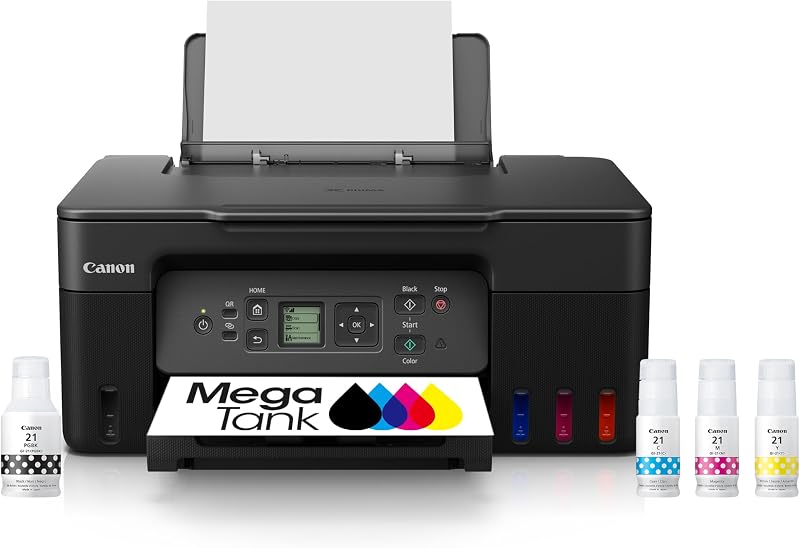
The Print Canon MegaTank G3270 All-in-One Wireless Color Printer provides print, copy, and scan functions backed by a refillable ink tank system in a compact desktop design. Households that produce massive quantities of school worksheets, coloring pages, and documents at home should consider this refillable tank model to minimize ongoing ink cartridge maintenance, provided they do not require off-grid battery power.
Canon PIXMA TR7120 Wireless Color
4.4 out of 5, average from Amazon buyers

The Canon PIXMA TR7120 Wireless Color inkjet printer features an automatic document feeder, duplex printing, an intuitive control panel, and a clean white chassis for home office environments. It represents a strong desktop fit for families seeking automated two-sided printing and crisp family graphics in a permanent setting. Those exploring dedicated desktop photo rendering can also assess how dedicated desktop lines like the canon 6520 printer compare against portable multifunction designs.
Final Verdict
Deciding whether the is hp officejet 250 worth it comes down to how much your family values true physical freedom from stationary office desks and power outlets. By packing a full color inkjet printer, an optical scanner, an automated 10-page document feeder, and an interactive touchscreen into a self-contained 6.5-pound chassis, this machine stands out as a genuine mobile command center. The included rechargeable battery, paired with rapid charging capabilities that replenish power within 90 minutes when turned off, ensures that urgent documents, medical forms, school sheets, and travel itineraries are always ready regardless of your physical location.
While high-volume domestic settings with demands for automatic duplexing and large ream-sized paper trays will prefer stationary desktop hardware, the HP OfficeJet 250 represents an exceptional investment for nomadic households, frequent road travelers, and mobile professionals. Its durable folding shell protects sensitive internal components during transit, and its direct wireless connectivity removes the headache of locating router connections on the road. For families seeking dependable, long-term mobile productivity without sacrificing scanning or copying capabilities, this compact all-in-one remains a standout choice.
FAQ
Does the HP OfficeJet 250 come with a rechargeable battery included?
Yes, the HP OfficeJet 250 includes a rechargeable battery pack directly in the box, allowing you to print, scan, and copy away from electrical outlets without purchasing a separate battery accessory.
How fast does the HP OfficeJet 250 fast charge feature work?
With HP Fast Charge, the printer charges within 90 minutes when the device is powered off, reaching up to 90 percent charge capacity in off-state mode from home, office, or vehicle AC power sources.
Can I print to the HP OfficeJet 250 without a Wi-Fi network?
Yes, the printer features HP Auto Wireless Connect, allowing laptops, tablets, and smartphones to establish a direct wireless connection to the printer without requiring an external network router or active internet connection.
What paper sizes does the HP OfficeJet 250 support?
The printer supports letter, legal, statement, executive, index cards (3×5, 4×6, 5×8 inches), photo paper (8×10, 5×7, 4×6, 3.5×5 inches), and envelopes including No. 10, Monarch, and 6 3/4 sizes.
Does the HP OfficeJet 250 support multipage document scanning?
Yes, the printer includes an integrated 10-page automatic document feeder that allows hands-free scanning and copying of multipage paperwork without feeding sheets one at a time.


