As Amazon Associates, we earn from qualifying purchases. This means we may receive a small commission at no extra cost to you if you click through and make a purchase.
The HP DeskJet 2855e is an entry-level multifunction color inkjet printer engineered specifically for everyday domestic printing, scanning, and copying tasks. Designed to tackle routine household paperwork, permission slips, school projects, and financial records, this compact unit combines basic output capabilities with cloud-enabled mobile software and automated connection management. For households that print intermittently and value simple operation in a space-saving form factor, it serves as a straightforward and practical home tool.
This all-in-one machine is best suited for students, busy parents, and casual users who generate modest print volumes each week, such as weekly meal plans, return labels, and short documents. However, households with intensive daily workloads or home-based business owners requiring rapid output, automated two-sided printing, or deep paper trays will find its deliberate pace and compact paper feeder restrictive, making higher-capacity hardware a more suitable choice.
HP DeskJet 2855e at a Glance

| Attribute | Detail |
|---|---|
| Device Type | All-in-One Color Inkjet (Print, Scan, Copy) |
| Black Print Speed | Up to 7.5 pages per minute |
| Color Print Speed | Up to 5.5 pages per minute |
| Input Paper Capacity | 60-sheet input tray (1 tray) |
| Scanner Type | Flatbed |
| Copy Speed and Run Limit | Up to 7.5 ppm black; maximum 9 copies per run |
| Compatible Cartridges | HP 67 (Black, Cyan, Magenta, Yellow) |
| Wireless Connectivity | 2.4 GHz Wi-Fi with self-healing connection |
| Dimensions and Weight | 11.97″D x 16.7″W x 6.06″H; 10 pounds |
| Supported Print Media | Plain paper, glossy photo paper, envelopes |
Everyday Document Performance and Print Speeds
Examining the hp deskjet 2855e specs highlights an engine tailored for light domestic duties rather than high-speed office workflows. The hardware delivers standard output ratings of up to 7.5 pages per minute for monochrome files and up to 5.5 pages per minute for color pages. In practical household terms, these hp deskjet 2855e print speed measurements mean that a two-page school permission slip or baking recipe finishes quickly, but printing a lengthy thirty-page manual will require patience. The internal single processor coordinates print jobs smoothly across plain paper, envelopes, and glossy photo paper.
A notable feature integrated into this printer is HP AI formatting assistance. When sending web pages or email chains directly to the printer, conventional setups often waste ink and blank paper on awkward page breaks, side navigation bars, and website ads. The AI processing systematically identifies unwanted web components and removes them before printing, ensuring clean formatting and properly scaled text. This optimization prevents wasted sheets and keeps household documents looking neat without manual cutting and pasting.
For families who have previously utilized older entry models like the hp 2755e printer, the everyday print clarity remains dependable for standard text and colorful charts. Text lines print with solid legibility, while casual color graphics and recipe illustrations show balanced saturation. While it is not designed to produce gallery-grade photography, the ability to feed glossy photo paper through the single rear tray gives parents and kids an easy outlet for weekend craft projects.
Wireless Setup and Mobile App Convenience
Network integration can often frustrate non-technical users, but the hp deskjet 2855e wireless setup relies on guided smartphone pairing via the HP App to minimize friction. The setup utility walks you step-by-step through network discovery on iOS and Android devices, connecting the printer to your wireless router without complex manual addressing. Through the mobile interface, family members can print documents, initiate scans, monitor ink reserves, and configure digital faxes from smartphones, tablets, or personal computers.
It is important to emphasize a key connectivity limitation: this printer is only 2.4 ghz capable. In homes operating modern dual-band routers that merge 2.4 GHz and 5.0 GHz signals under a single network name, you must ensure the setup device communicates across the 2.4 GHz band during initialization. To maintain stability after pairing, the unit includes self-healing Wi-Fi technology that automatically detects wireless interruptions and resets the connection internally before print queues stall.
The companion app also serves as an adaptable workflow center for busy family schedules. Parents can capture a signed medical release on their phone camera, convert it to a tidy document, and send it through the mobile fax tool without touching an analog phone line. Because all essential functions can be executed wirelessly, the physical printer can reside wherever Wi-Fi reception is strong, whether tucked away on a study shelf or placed on a living room credenza.
Scanning and Copying Capabilities for Family Records
The built-in hp deskjet 2855e scanner copier features provide necessary tools for digitizing family papers, archiving financial receipts, and generating quick paper copies. The hardware incorporates a flatbed glass scanner capable of capturing single sheets, bound book pages, and delicate keepsakes. Because documents lie flat on the glass, there is no risk of delicate items or crumpled store receipts jamming inside mechanical feed rollers during scanning.
When operating as a standalone copier, the hp deskjet 2855e all in one system reaches black copying speeds of up to 7.5 pages per minute. However, the machine features a firm firmware restriction of 9 maximum copies per run. While this limit is sufficient for replicating a utility bill, insurance card, or single school assignment, it is not engineered for producing large stacks of event flyers or meeting handouts. Users requiring bulk copies will need to initiate multiple consecutive cycles manually.
Digital files created through the flatbed scanner can be saved, cropped, and shared directly using the HP App on mobile devices or PCs. Rather than storing scans solely on a local hard drive, users can route digitized files to email addresses or cloud storage services. This integration streamlines family organization, making it easy to store tax forms, school registration records, and recipe clippings in shared family folders.
Cartridge Longevity and the Instant Ink Ecosystem
Print supply management is handled via the hp 67 ink replacement system, which employs a two-cartridge configuration: one black cartridge and one tri-color cartridge combining cyan, magenta, and yellow. A dual-cartridge design simplifies maintenance because users only handle two physical slots rather than multiple individual color tanks. A common trade-off with tri-color cartridges, however, is that if one primary color runs dry during a heavy color project, the entire cartridge must be replaced to restore full color fidelity.
To assist with ongoing supply replenishment, this printer includes a 3-month trial of the hp deskjet 2855e instant ink service when HP+ is activated during setup. Under this subscription model, the printer tracks usage levels automatically and prompts home delivery of replacement ink before cartridges run empty. Once the three-month promotional window concludes, a recurring monthly fee applies based on your selected page tier unless the subscription is canceled. For families with steady, predictable printing habits, this program avoids sudden cartridge shortages.
Households with heavy volume demands should consider whether cartridge-based printing aligns with their long-term usage patterns. While standard cartridges suit intermittent needs, users printing dozens of pages weekly may find that an hp all in one printer wireless smart tank or an epson ecotank et-4950 wireless all-in-one color supertank printer offers much greater page capacity between refills. Assessing your family’s realistic monthly page output is essential for picking the most convenient printing technology.
Design, Paper Handling, and Family Usability
Physical dimensions play a major role in how comfortably a device fits into a shared living space. Measuring 11.97 inches deep, 16.7 inches wide, and 6.06 inches high, and weighing 10 pounds, the DeskJet 2855e maintains a compact footprint that easily fits on shallow desks, bookcases, or bedroom dressers. Its lightweight build makes it simple to reposition whenever room layouts change, and its low profile ensures it remains unobtrusive in multi-purpose family spaces.
Paper management is anchored by a single rear-loading 60-sheet input tray. For households that print an occasional permission slip, recipe, or shipping label, a 60-sheet stack lasts through weeks of normal use without reloading. However, homes with multiple students printing research papers will need to refill the paper tray regularly. Additionally, because the listing does not specify automatic duplex printing, double-sided output requires manually flipping and reinserting pages into the feed tray.
When assessing the hp deskjet 2855e for home use, hardware durability and software security remain essential considerations. The manufacturer lists extended warranty support, and automated security firmware updates protect the unit against network vulnerabilities. For everyday domestic tasks where ease of use, compact sizing, and wireless app access matter more than rapid volume, this hp deskjet 2855e family printer functions as an approachable household appliance.
HP DeskJet 2855e Pros and Cons
Pros
- Compact 10-pound space-saving design
- AI formatting removes unwanted web elements
- Mobile printing and scanning via HP App
- Self-healing 2.4 GHz wireless connection
- Three months of Instant Ink included
Cons
- Limited to 2.4 GHz Wi-Fi bands
- Modest 7.5 ppm black print speed
- Firmware caps copying at 9 pages per run
- Single 60-sheet input paper tray
Who Should Buy the HP DeskJet 2855e
Evaluating whether the is hp deskjet 2855e worth it comes down to matching your family’s weekly page output against its compact feature set.
Buy It If
- You need a lightweight, compact multifunction printer for occasional household documents, school forms, and recipes.
- You prefer managing print, scan, and mobile fax tasks from your smartphone or tablet using a centralized app.
- You want automated ink replenishment delivered to your door via the included 3-month Instant Ink trial.
- You frequently print online pages and want AI layout formatting to eliminate blank trailing sheets and awkward margins.
Skip It If
- You require high-volume output or automatic two-sided duplex printing for business reports and large document packets.
- Your home wireless network runs exclusively on a 5.0 GHz band without backward compatibility for 2.4 GHz devices.
- You regularly make batch copies that exceed the hardware limit of 9 copies per run.
HP DeskJet 2855e Alternatives Worth a Look
If your household requires features beyond the modest scope of the DeskJet 2855e, several alternative models cater to different printing habits and workloads.
Cost Efficient Multi-Function Photo Printer
4.9 out of 5, average from Amazon buyers

The Cost Efficient Multi-Function Photo Printer, also designated as the Canon PIXMA TS4320, provides wireless color printing, copying, and flatbed scanning in a compact desktop chassis. Families who place an emphasis on casual photo printing alongside basic document duplication should consider this all-in-one alternative for craft and photo-centric home use.
Canon PIXMA TS6520 Wireless Color
4.6 out of 5, average from Amazon buyers

The Canon PIXMA TS6520 Wireless Color inkjet printer features integrated automatic duplex printing and an integrated 1.42-inch OLED display screen for direct menu navigation. Users who frequently produce double-sided documents and prefer visual on-device controls over exclusive smartphone operation will find this model a compelling upgrade.
HP OfficeJet Pro 8125 Wireless
4.1 out of 5, average from Amazon buyers
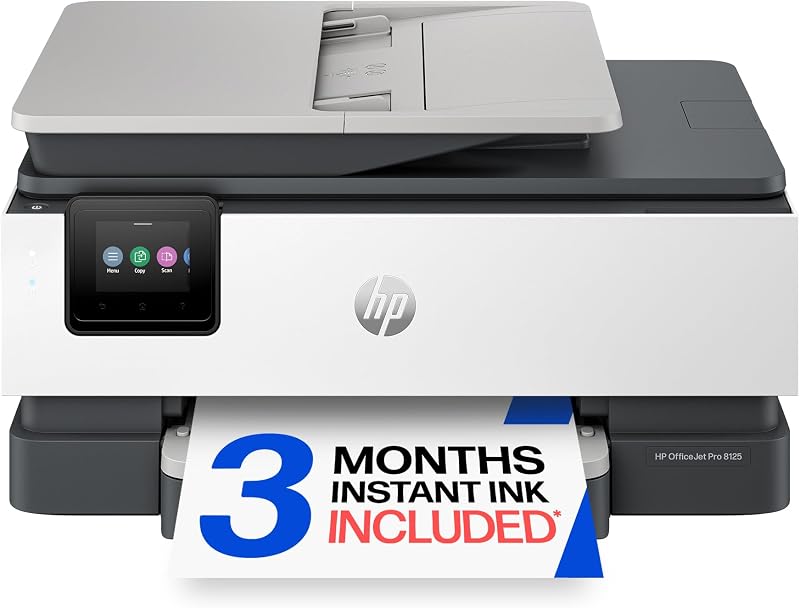
For households operating a busy home office, the HP OfficeJet Pro 8125 Wireless all-in-one offers an automatic document feeder (ADF), duplex printing, and AI capabilities alongside a 3-month trial of Instant Ink. It represents a heavy-duty alternative for shoppers who need faster page generation and larger paper capacities than an entry-level DeskJet can deliver.
Final Verdict
The HP DeskJet 2855e provides a practical, straightforward solution for households seeking an unobtrusive device for light printing, flatbed scanning, and basic copying. Its combination of AI-assisted web formatting, self-healing 2.4 GHz wireless connectivity, and comprehensive mobile app controls ensures that routine paperwork, recipes, and school assignments can be completed without technical hurdles.
While its modest print speeds of up to 7.5 ppm black and 5.5 ppm color, 60-sheet paper tray, and 9-copy run limit make it unsuitable for high-volume office tasks, it succeeds within its intended casual domestic role. For families seeking an accessible, compact multifunction printer that takes up minimal desk space, the DeskJet 2855e fulfills everyday home printing needs reliably.
FAQ
Can the HP DeskJet 2855e connect to 5.0 GHz Wi-Fi?
No, the listing specifies that this printer is only 2.4 GHz capable. When setting up the printer on your home network, make sure your router has an active 2.4 GHz frequency available so the device can connect and communicate properly.
What ink cartridges does this printer use?
The printer uses HP 67 replacement cartridges. It operates with a two-cartridge system: one black ink cartridge and one tri-color cartridge that contains cyan, magenta, and yellow ink.
Does the HP DeskJet 2855e support automatic double-sided printing?
The listing does not specify automatic duplex printing for this unit. To print on both sides of a page, users must manually reinsert the paper into the 60-sheet rear feeder tray.
How does the included 3-month Instant Ink trial work?
When you set up the printer and activate HP+, you can enroll in a 3-month trial of the Instant Ink service. The printer monitors ink levels and automatically orders replacement cartridges to your door before you run out. After the three months, a monthly fee applies unless canceled.
Can you send faxes with this printer?
Yes, mobile fax functionality is supported through the HP App. Users can prepare and send digital faxes directly from their smartphone, PC, or tablet without requiring an analog landline connection to the printer.


