As Amazon Associates, we earn from qualifying purchases. This means we may receive a small commission at no extra cost to you if you click through and make a purchase.
Shoppers weighing whether to source a pre-owned craft cutter or purchase a current model face a tough balance between upfront cost and long-term hardware reliability. When exploring the secondary market for a craft cutter, looking at the Cricut Maker 4 helps establish a clear benchmark for what a modern, dependable cutting workstation delivers. The Cricut Maker 4 is a next-generation smart cutting machine finished in Seashell, packaged as a complete digital content bundle designed for multi-material crafting right out of the box. Our verdict is that while seeking out a used machine may appear economical at first glance, the Maker 4 bundle offers factory-fresh mechanical tolerances, verified motor health, and cutting speeds up to two times faster than the previous generation, making it the superior overall value for households seeking uninterrupted crafting.
This machine is ideally suited for parents, small craft businesses, and creative hobbyists who plan to work across diverse materials like heavy cardstock, leather, and balsa wood without inheriting the wear and tear of a secondhand unit. Those who only plan to make simple, occasional paper labels or who prefer not to navigate computer-guided design software will find this heavyweight tool more than they require and should consider a compact, single-purpose alternative instead.
Cricut Maker 4 at a Glance

| Feature | Specification |
|---|---|
| Model Number | 8002707 |
| Color Finish | Seashell |
| Dimensions (D x W x H) | 7.1″D x 22.1″W x 6.2″H |
| Item Weight | 9.59 kg |
| Active Surface Area | 270.25 sq in |
| Housing Material | Plastic |
| Operation Mode | Automatic |
| Material Compatibility | 300+ materials (leather, wood, vinyl, iron-on HTV, cardstock, stickers) |
| Software Ecosystem | Design Space app (includes 3,000+ free images and 100+ fonts) |
| Print Integration | Print-Then-Cut compatible with most standard inkjet printers |
Multi-Material Versatility and Tool Capabilities
A primary factor when deciding between an older model and this newest release centers on the scope of projects your household can tackle. The official specifications confirm that the Cricut Maker 300 materials compatibility spans dense fabrics, tooling leather, basswood, cardstock, iron-on heat transfer vinyl, and self-adhesive vinyl. Beyond simple blade slicing, the machine is engineered to draw, foil, score, engrave, deboss, and perforate. This breadth means that a single creative hub can manufacture personalized apparel, rigid gift boxes, dimensional home accents, and debossed leather luggage tags without requiring separate dedicated machines.
When assessing a cricut maker used by a prior owner, potential buyers must recognize that specialized tools place varying degrees of mechanical stress on the drive system. Cutting dense materials like wood or thick leather demands steady pressure and precise roller traction. With a brand-new machine, the internal gear assemblies, drive belts, and tool carriage bearings operate with zero accumulated fatigue. This ensures that when you switch from delicate vellum to thick tooling leather, the blade pressure and carriage tracking remain consistent across every cut pass.
The bundle format significantly accelerates your project timeline by supplying essential accessories directly in the package. Included alongside the cutting unit are a Fine-Point Blade, a Light Grip Mat, a Weeder tool, a Fine Point Pen, and a diverse Materials Sampler containing Smart Vinyl, Matless Vinyl, Smart Iron-On, Matless Heat Transfer Vinyl, Cardstock, and Transfer Tape. Sourcing these tools and materials individually to accompany an older pre-owned cutter frequently negates any anticipated financial savings before the first project is even finished.
Cutting Speed, Precision, and Inkjet Printing Integration
Crafting efficiency is another area where the hardware architecture shows clear advancement. The Cricut Maker 4 cuts up to two times faster than the previous generation model, providing immediate time savings when producing multi-piece classroom sets, holiday gift tags, or personalized team shirts. Paired with an active surface area of 270.25 square inches, the machine accommodates larger cut paths and extended banner designs without frequent manual adjustments, allowing users to run intricate cut files with smooth automated precision.
For makers interested in producing vibrant, full-color stickers and apparel graphics, the integrated Print-Then-Cut feature represents a major functional highlight. This system pairs the machine with most standard home inkjet printers, allowing you to print full-color graphics on sticker sheets or printable vinyl before loading the sheet into the cutting machine. Optical sensors locate the printed registration marks, enabling the blade to slice neatly around custom artwork contours with tight accuracy. Just as you might appreciate efficient morning prep using a ninja barista coffee maker before a busy day, having automated cutting precision transforms custom sticker production into a streamlined, predictable process.
Evaluating the cricut maker 4 specs highlights how modern sensor calibration directly impacts project success. Older pre-owned units can suffer from misaligned optical sensors, scratched lens covers, or worn rubber feed rollers, which often leads to misaligned cuts on printed sticker paper. Investing in an unblemished cutting carriage ensures that intricate sticker borders, decal outlines, and detailed papercraft designs match the digital artwork file without frustrating shifts or wasted media.
Used vs New Cricut Maker: Durability and Ownership Risks
Prospective buyers frequently ask: is a used cricut maker worth it for family hobbyists? While browsing secondhand marketplaces for a cricut maker used listing can reveal tempting initial sticker tags, buying a used cricut maker carries unique risks distinct from traditional mechanical appliances. Electronic cutting machines rely on sensitive drive belts, internal micro-stepper motors, and optical calibration sensors that are impossible to verify through online marketplace photos. If a previous owner subjected the unit to excessive cutting pressure, used incorrect third-party blades, or allowed adhesive lint to collect inside the carriage tracks, you may inherit chronic drift, motor grinding, or incomplete cuts.
There is also the critical issue of hardware registration and software status. Cricut cutting machines operate exclusively through the cloud-connected Design Space software platform. When an older machine has been deactivated due to past replacement claims or warranty settlements, it is permanently locked out of the software ecosystem and cannot execute cuts. When comparing a used vs new cricut maker, the new unit guarantees an unencumbered serial number, active manufacturer coverage, and immediate access to the 30 bonus digital images that unlock in Design Space upon the initial setup of this bundle.
Long-term machine reliability is paramount for busy homes. The Cricut maker durability built into a brand-new Maker 4 provides peace of mind through reinforced internal components and pristine feed rollers. In a lively home where multiple family members engage in creative crafting, having reliable equipment prevents downtime. Just as households value dependable kitchen essentials like a cuisinart round classic waffle maker for weekend routines, a factory-fresh craft machine guarantees that holiday projects, school assignments, and family gifts proceed smoothly from start to finish.
Software Usability and the Family Crafting Experience
A smart cutting machine is only as effective as the software driving it, and the Cricut ecosystem is designed to bridge the gap between creative ambition and technical execution. The Design Space app connects seamlessly to the Maker 4 across desktop and mobile devices, providing an accessible canvas for users with no prior design experience. The free standard content library includes over 3,000 images and more than 100 fonts, allowing crafters to assemble custom lettering, vinyl decals, and card templates immediately after setup without requiring paid add-ons.
For those questioning whether the Cricut maker for beginners creates an intimidating technical barrier, the intuitive layout of Design Space simplifies project staging. The software guides you step-by-step through tool selection, material load verification, and cut pressure configuration. For households seeking an expansive design catalog, an optional paid Cricut Access subscription unlocks more than 1.5 million images, 1,000 fonts, and 100,000 projects, though basic project creation, custom SVG file uploading, and the 30 bundled bonus images function without any mandatory subscription fee.
When organizing cricut maker family crafts, having a stable, modern machine transforms weekend afternoons into collaborative creative workshops. Children and parents can design personalized water bottle decals, custom t-shirt transfers, and festive seasonal greeting cards with minimal setup friction. Reading through our circuit maker 4 overview provides further perspective on how modern craft cutters elevate routine home projects into professional-quality keepsakes. Choosing a new Maker 4 eliminates the software connection glitches and firmware update mismatches that frequently plague older, discontinued hardware.
Cricut Maker 4 Pros and Cons
Pros
- Cuts over 300 materials including wood and leather
- Up to two times faster cutting speed
- Includes starter materials sampler and weeding tool
- Print-Then-Cut compatibility with standard inkjet printers
- Includes 30 bonus digital images upon registration
Cons
- Substantial 9.59 kg weight requires dedicated craft space
- Access to full image catalog requires optional subscription
- Requires separate inkjet printer for Print-Then-Cut projects
Who Should Buy the Cricut Maker 4
Buy It If
- You want to cut, score, deboss, and engrave across more than 300 materials without worrying about previous mechanical wear.
- You require cutting speeds up to two times faster than previous generations to finish high-volume craft projects efficiently.
- You want an out-of-the-box bundle that includes a weeding tool, fine-point blade, pen, mat, and a diverse sampler of smart and matless materials.
- You value the certainty of an unactivated serial number, factory warranty support, and bundled bonus digital images in Design Space.
Skip It If
- You only intend to cut basic vinyl labels or small greeting cards occasionally and do not require heavy-duty tooling.
- You have limited desktop workspace, as this full-sized machine measures 22.1 inches wide and weighs 9.59 kg.
- You prefer working entirely offline without computer or mobile app connectivity.
Cricut Maker 4 Alternatives Worth a Look
If your crafting scope, workspace dimensions, or hardware preferences do not align perfectly with a full-sized multi-material powerhouse, several capable alternative cutting systems offer distinct advantages for different types of makers.
VEVOR Vinyl Cutting Machine
Our score: 8.4/10

The VEVOR Vinyl Cutting Machine is a 12-inch, button-controlled vinyl cutter that comes equipped with over 20,000 built-in design resources and features broad operating system compatibility across Mac, Windows, Android, and iOS. This unit is built specifically for creating customized craft cards and home decor from standard adhesive vinyl and heat transfer films. Shoppers who focus primarily on vinyl lettering, sign making, and decal production rather than deep cutting of dense fabrics or woods may prefer this button-controlled alternative for straightforward signcraft.
Includes 30 images in Design
Our score: 8.6/10

The Includes 30 images in Design Space App Cricut Joy Xtra smart cutting machine digital bundle offers an ultra-compact footprint for crafters with limited counter space. Like the larger Maker 4 bundle, it provides access to the Design Space software and includes 30 bonus images, but focuses on smaller everyday projects such as custom stickers, personalized cards, and compact vinyl transfers. Crafters who want Cricut software integration in an apartment-friendly size without the physical bulk of a 22-inch machine will appreciate this compact alternative.
Brother SDX125E ScanNCut Electronic Cutting
Our score: 9.4/10
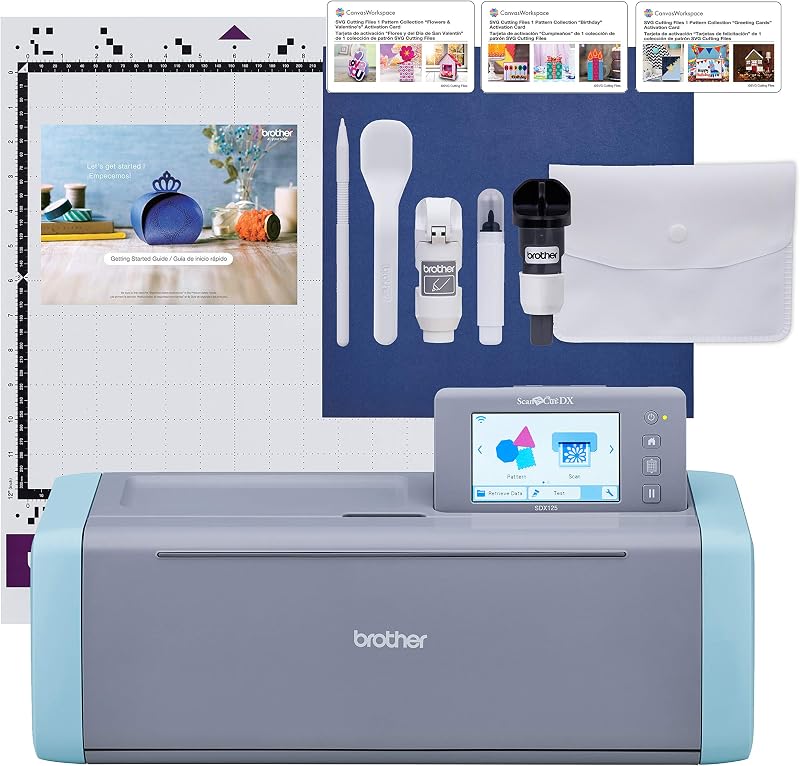
The Brother SDX125E ScanNCut Electronic Cutting Machine Scanner provides built-in scanning functionality that allows crafters to scan drawings, fabric patterns, or printed documents directly on the device without requiring an external inkjet printer or digital vector conversion. Quilters, fabric artists, and papercrafters who want an all-in-one standalone cutting and scanning station that operates independently of third-party computer software may find this Brother scanner-cutter better matched to their creative workflow.
Final Verdict
Determining whether a cricut maker used is the right path ultimately hinges on how much you value dependability, speed, and comprehensive project capability. While hunting down a secondhand cutting machine might seem to offer immediate savings, the hidden risks of unverified motor fatigue, roller misalignment, missing proprietary accessories, and potential software deactivation can quickly derail your crafting experience. In contrast, the Cricut Maker 4 bundle eliminates uncertainty by pairing a brand-new, factory-calibrated cutting engine with a curated starter set of tools, smart materials, and digital design files.
When asking is cricut maker worth it for family crafting, the answer is a resounding yes when you invest in the reliability of a modern machine. Delivering cutting speeds up to two times faster than its predecessor, an expansive library of over 300 supported materials, and seamless inkjet Print-Then-Cut integration, the Cricut Maker 4 serves as a durable, long-term creative anchor for any busy household. Choosing the complete Maker 4 bundle ensures that every school display, personalized holiday gift, and home decor project starts with precision and finishes without frustration.
FAQ
What makes buying a used Cricut Maker risky?
Purchasing a used electronic cutting machine carries hidden hardware risks because wear on the internal drive belts, optical sensors, and motor assemblies cannot be confirmed before use. Additionally, machines that have been deactivated through warranty replacements cannot be registered in Design Space, rendering them completely inoperable.
What materials can the Cricut Maker 4 cut?
The Cricut Maker 4 is engineered to work with over 300 materials. According to the manufacturer listing, these include leather, balsa wood, vinyl, iron-on heat transfer vinyl, cardstock, printable sticker sheets, and specialized crafting fabrics.
Does the Cricut Maker 4 require a paid monthly subscription?
No, the machine does not require a paid subscription to operate. The free Design Space software includes basic editing tools, 3,000+ images, 100+ fonts, and full file uploading capabilities. The bundle also provides 30 bonus digital images. An optional paid Cricut Access subscription is available if you wish to unlock a larger library containing over 1.5 million images and additional fonts.
How does the Print-Then-Cut feature function on this machine?
The Print-Then-Cut feature allows you to print full-color graphics from Design Space onto printable vinyl, sticker paper, or cardstock using most standard inkjet printers. Once printed, you place the sheet into the Cricut Maker 4, where onboard sensors detect the printed alignment marks and automatically cut precise outlines around your artwork.
What accessories are included inside the Cricut Maker 4 bundle?
The bundle contains the Cricut Maker 4 smart cutting machine in Seashell, a Fine-Point Blade, a Light Grip Mat, a Weeder tool, a Fine Point Pen, and 30 bonus digital images in Design Space. It also includes a comprehensive Materials Sampler featuring Smart Vinyl, Matless Vinyl, Smart Iron-On, Matless Heat Transfer Vinyl, Cardstock, and Transfer Tape.


