As Amazon Associates, we earn from qualifying purchases. This means we may receive a small commission at no extra cost to you if you click through and make a purchase.
Taming digital distractions often feels like a constant battle against built-in phone habit loops, which is why the Brick Phone Lock takes a distinctively tangible approach to screen time management. Rather than relying solely on easily dismissed on-screen reminders or software timers that you can bypass with a simple tap, this compact device pairs a dedicated smartphone companion application with a physical desktop hub to enforce intentional friction. By requiring you to physically tap your handset against the hardware accessory to release blocked apps, it creates an immediate barrier between compulsive scrolling urges and everyday digital productivity.
This hardware-backed distraction blocker suits busy professionals, students, and households wanting an intentional boundary without forfeiting emergency phone capabilities. If your goal is to silence distracting notifications and social feeds while preserving phone calls, camera utilities, and essential messaging, this tool delivers a practical workflow. Conversely, shoppers searching for an unbreakable physical safe that encloses their device entirely or individuals who need an automatic schedule that prevents overrides even if they walk across the room should consider a traditional timed containment container instead.
Brick Phone Lock at a Glance

| Attribute | Detail |
|---|---|
| Device Type | Physical smartphone access blocker |
| Brand | Brick |
| Manufacturer | Brick |
| Hardware Color | Grey |
| Connectivity | Wireless |
| Package Dimensions | 4.53 x 3.78 x 1.38 inches |
| Item Weight | 3.17 ounces |
| Software Access | Subscription-free lifetime access to the Brick app |
| Items Included | 1 Brick device |
How the Physical Tap Friction Mechanism Works
Understanding how brick phone lock works requires looking at how human behavior responds to small physical obstacles. Standard software screen limits often fail because dismissing a digital prompt takes a single swipe or a quick passcode entry. The Brick system introduces intentional, physical separation into that equation. You configure your restricted list inside the companion mobile app, choose the tools or platforms you want to pause, and tap the back of your smartphone against the wireless grey hardware. Once engaged, those specific applications and their associated notifications vanish from your accessible routine until you walk back over and tap the device a second time.
This physical requirement alters the psychology of mindless phone checks. Placing the 3.17-ounce unit on a foyer credenza, an office bookshelf, or high on a kitchen counter forces you to stand up and walk across the room to unlock your distracting feeds. That momentary delay is usually enough to interrupt automatic reach-and-scroll impulses. Because the device operates wirelessly, you can position it anywhere in your home or workspace where it creates the ideal amount of walking distance between your desk and the unlock station.
Regarding technical connectivity and internal power, the manufacturer listing identifies the hardware display feature as wireless, though the listing does not specify battery chemistry, charging port types, or operational battery life spans. In day-to-day operation, the wireless tap functionality bridges the physical tool and the digital operating system, allowing you to lock away time-wasting apps while keeping your smartphone resting beside you on your desk as a functional calculator, notepad, or telephone.
Focus Modes and Customization for Daily Routines
A primary strength highlighted throughout this brick phone lock review is how adaptable the software rules are for diverse schedules. Rather than treating all phone use as inherently negative, the application lets you configure distinct profiles tailored to different segments of your day. You can design a Work mode that mutes entertainment platforms, news aggregators, and shopping portals while keeping email and team communication channels active. When your workday ends, switching over to Family Time mode can mute business communication and social feeds so you remain fully engaged around the dinner table or during evening routines.
Implementing the brick phone lock for families provides parents and students with a clear structural framework. During evening study sessions, activating School mode ensures that educational portals, reference materials, and essential parent contact channels remain open, while video streaming and gaming applications are locked behind the physical hub. Much like securing a home entryway with dependable hardware such as the kwikset pismo deadbolt, setting up firm boundaries with dedicated physical tools helps establish clear domestic rules that everyone can easily understand and respect.
This multi-mode flexibility also prevents the common issue of focus fatigue. Many screen limiters fail because users feel suffocated by rigid, all-or-nothing lockouts that break everyday logistics. By creating distinct profiles with the brick focus modes, you can decide exactly which utilities remain accessible. If you need navigation, music streaming, and mobile payments during a commute, you leave those unlocked while keeping social feeds and mobile games shut down until you intentionally tap back in.
Subscription-Free Software Model and Long-Term Value
In an era where modern utility tools frequently demand monthly recurring memberships, the brick app blocker subscription free model is an immediate benefit for budget-conscious households. The hardware purchase includes lifetime access to the Brick application without additional service fees. This standalone structure means you do not have to worry about recurring credit card charges just to maintain digital balance in your household.
Evaluating the long-term utility of the device reveals how a one-time purchase approach protects household value over several years. Many software-only focus utilities lock advanced profiles, detailed metrics, or multi-device support behind expensive monthly tiers. In contrast, the Brick ecosystem provides complete functionality out of the box, allowing students, remote professionals, and parents to configure their daily routines without worrying about price hikes or renewal deadlines.
For family environments already managing various connected home accessories—from smart entry points like the eufy familock s3 max to general household automation—keeping software subscriptions to a minimum is a major priority. Brick avoids ongoing software fees entirely, making it a predictable, durable asset in your daily productivity toolkit.
Screen Time Tracking and Habit Accountability
Meaningful behavior change relies on clear feedback, and the Brick platform incorporates direct accountability into its software interface. As soon as you tap your smartphone against the unit to start a session, a timer begins logging your focused interval. Over days and weeks, the application compiles these sessions into measurable metrics, including cumulative hours spent locked away from distractions and daily average Bricked time.
Reviewing these analytics provides concrete insight into where your attention goes. Users often underestimate how many hours they spend browsing algorithmic feeds. By glancing at the companion dashboard, you can see objective proof of how many uninterrupted hours you reclaimed for work, reading, hobbies, or family conversations. For parents guiding younger users, using the brick phone lock for kids offers visual data that reinforces healthy digital habits through transparent daily milestones.
Tracking focused periods also turns habit building into an encouraging daily routine rather than an exercise in deprivation. Watching your daily average Bricked time increase across consecutive weeks provides a sense of personal accomplishment. Instead of feeling restricted, users experience the tangible relief of maintaining dedicated offline space throughout their morning and evening routines.
Brick vs Timed Lock Box Mechanisms
When shoppers compare the brick vs timed lock box approach, they are choosing between two fundamentally different philosophies of habit control. A mechanical or electronic lock box encloses your entire smartphone behind solid or translucent plastic, preventing any physical interaction until a countdown timer reaches zero. While complete containment is effective for extreme phone dependency, it introduces considerable practical drawbacks for working adults and busy parents.
Physical lock boxes prevent you from answering urgent phone calls, checking medical monitoring alerts, accessing two-factor security codes, or using your device for turn-by-turn navigation. If an unexpected emergency occurs, you are either locked out of communication entirely or forced to trigger an emergency override mechanism that ruins the lock box. In contrast, the Brick device leaves your smartphone physically accessible in your hands. You can still accept incoming phone calls from family members, check your calendar, or send urgent text messages, while the apps that drain your time remain locked.
Just as specialized home access components like a g2 gateway for smart door lock focus on executing one dedicated communication job reliably, the Brick acts as an intentional gatekeeper for software access. It preserves your phone as an essential daily utility while surgically stripping out notifications, algorithmic feeds, and compulsive habit loops.
Brick Phone Lock Pros and Cons
Pros
- Subscription-free lifetime companion app access included
- Physical tap-to-lock friction stops mindless scrolling
- Customizable focus modes for work school family
- Keeps essential calls active while blocking distractions
- Built-in timer tracks daily focused session metrics
- Compact wireless grey hardware fits any room
Cons
- Requires returning to physical device to unlock
- Listing does not specify battery or charging details
- Does not physically enclose handset like lock boxes
Who Should Buy the Brick Phone Lock
Buy It If
- You want to eliminate distracting social media apps and games while keeping your smartphone active for essential calls, text messages, and navigation.
- You prefer a subscription-free platform that includes lifetime companion application access without recurring monthly membership fees.
- You need custom focus modes that let you shift seamlessly between professional work blocks, classroom study sessions, and family evenings.
- You benefit from physical friction that forces you to step away from your desk to unlock distracting feeds.
Skip It If
- You require a heavy-duty container that physically encloses your handset to prevent you from touching the screen altogether.
- You lack the discipline to leave the physical Brick device in another room and might keep it right beside your workstation.
- You are seeking an automated scheduling box that locks your phone on a timed countdown without relying on an NFC tap workflow.
Brick Phone Lock Alternatives Worth a Look
If you prefer complete physical isolation from your handset or want a container that seals away other household temptations alongside your mobile phone, several timed container alternatives provide different styles of access control.
Mindsight Timed Lock Box
Our score: 8.2/10
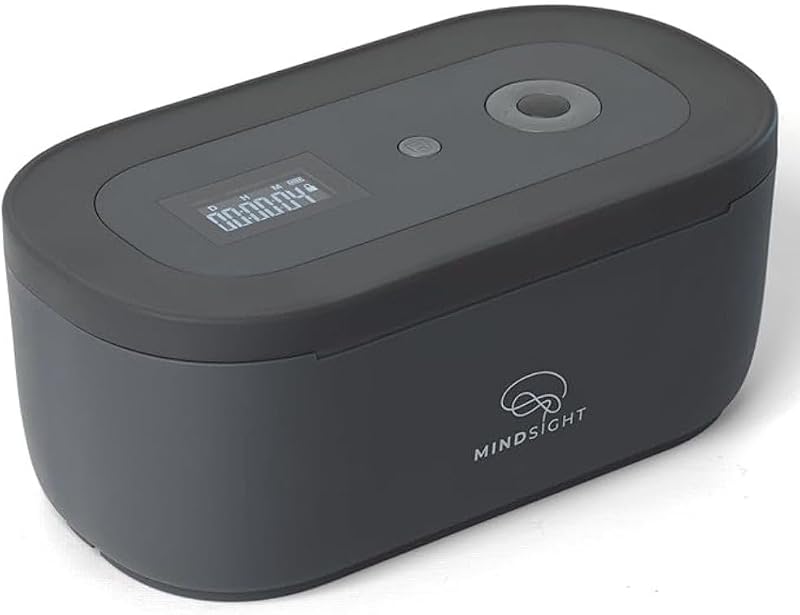
The Mindsight Timed Lock Box is a dedicated physical container built to help individuals unplug from phones, video games, social media feeds, snacks, and personal cravings. It features three distinct operating modes tailored around individual willpower levels to keep temptations locked securely out of sight until the timer expires. This option suits users who want absolute physical separation from their devices or who need to restrict access to food and gaming accessories as well as smartphones.
ySky Phone Lock Box
Our score: 8.4/10

Designed specifically for mobile devices, the ySky Phone Lock Box acts as a timed jail locker that holds your smartphone behind a locked casing. It limits screen time and enforces focus for students, kids, and adults who find software blockers too easy to bypass. It is ideal for individuals who want an affordable, strict timer that physically prevents handset usage during homework or study periods.
Safe Lockable Box with Digital
Our score: 7.6/10

The Safe Lockable Box with Digital timer provides a multi-purpose secure enclosure manufactured by Vaydeer for cutting down screen time, video gaming, and snacking. Featuring an integrated digital timer, it offers a secure, physical chamber that prevents premature retrieval. Choose this model if your household requires a versatile storage safe that can lock away larger items like handheld consoles, snacks, and multiple phones simultaneously.
Final Verdict
Determining whether the brick phone lock worth it comes down to how you prefer to manage digital temptation. Software limits on modern phones are notoriously easy to bypass when willpower dips, while physical lock boxes often feel too restrictive because they cut off vital communication and emergency contact. The Brick strikes a smart middle ground by pairing the flexibility of digital application blocking with the psychological barrier of physical distance. Leaving the wireless grey module in another room creates just enough physical friction to break the impulse of mindless scrolling.
Supported by lifetime app access without recurring fees, customizable profiles for school, work, and family routines, and built-in tracking metrics, the Brick Phone Lock is a well-designed tool for intentional living. For households and professionals seeking a reliable, durable system to build healthier phone habits while keeping essential communication lines open, this device earns a confident recommendation.
FAQ
How does the Brick Phone Lock block apps on my phone?
You select which applications and websites you want to restrict inside the companion application. When you tap your smartphone against the wireless Brick device, the system engages the chosen focus mode, temporarily hiding those distracting apps and their incoming notifications from your view. Tapping your phone against the unit a second time unblocks those apps and restores normal access.
Does using the Brick Phone Lock require a monthly subscription?
No, the product is completely subscription-free. Purchasing the physical unit includes lifetime access to the Brick application and its feature set with no recurring charges or hidden membership tiers.
Can I still receive phone calls and emergency messages while my phone is Bricked?
Yes. Unlike timed lock boxes that seal your device inside a plastic container, this tool only blocks the specific apps and websites you select. Your smartphone remains fully operational for phone calls, basic utility tools, emergency alerts, and whatever core apps you leave off your restricted list.
What are the primary brick screen time specs and package contents?
The package includes 1 grey Brick device. The unit features wireless connectivity, measures 4.53 x 3.78 x 1.38 inches in package dimensions, and weighs 3.17 ounces. The manufacturer listing notes it is wireless, though the listing does not specify exact battery specifications or internal charging mechanisms.
Can parents use this device to manage focus time for their children?
Yes. Parents can configure custom profiles such as School mode or Family Time mode on a student’s phone. By keeping the physical Brick module in a shared family area or home office, children must physically present their phone to unlock non-educational apps, fostering accountability during homework and evening routines.


