As Amazon Associates, we earn from qualifying purchases. This means we may receive a small commission at no extra cost to you if you click through and make a purchase.
The Atomstack A5 Pro is a desktop laser cutter and engraver built around an all-metal anodized aluminum alloy frame and a 5W to 5.5W optical diode output. Designed for hobbyists, crafters, and home workshop fabricators, it pairs fine motion control with compressed spot laser technology to mark and cut materials such as wood, leather, dark acrylic, and coated metal. Our verdict is that this machine delivers exceptional mechanical stability and fine detail for hobby-scale projects, provided users account for the pacing required by a five-watt diode laser.
This desktop tool suits craft enthusiasts and family makers who prioritize frame rigidity, software flexibility, and dependable precision for custom signage, personalized gifts, and decor. Because it features a Class 4 open-frame design, it requires dedicated eye protection and careful workspace planning. Makers needing a plug-and-play enclosed machine with built-in cameras, or industrial operators requiring rapid single-pass cuts through thick lumber, should evaluate higher-power alternatives instead.
Atomstack A5 Pro at a Glance

| Feature or Specification | Manufacturer Detail |
|---|---|
| Item Model Number | AT-A5-Pro |
| Optical Laser Power | 5W to 5.5W (5000mW output level) |
| Laser Safety Classification | Class 4 |
| Laser Spot Characteristics | 0.08mm compressed spot, 0.23mm² focus area |
| Maximum Running Speed | 11000mm/min |
| Frame Construction | Full anodized aluminum alloy with integrated screw rods |
| Supported Control Software | LaserGRBL (free on Windows), LightBurn (paid on Windows and Mac OS) |
| Supported File Formats | NC, BMP, JPG, PNG, DXF, and related formats |
| Product Dimensions | 23.62 x 13.78 x 5.51 inches |
| Item Weight | 11.22 pounds |
All-Metal Construction and Mechanical Stability
Frame rigidity is essential for consistent laser engraving, and the Atomstack A5 Pro metal frame stands out with its full anodized aluminum alloy chassis. Rather than relying on plastic corner brackets or lightweight modular joints, this machine uses solid structural metal designed to minimize operational vibration. The rigid foundation ensures that high-speed gantry reversals do not translate into distorted lines or uneven burn patterns across your workpiece.
A key engineering highlight detailed in the Atomstack A5 Pro specs is the use of integrated screw rods instead of the combined couplings found on many entry-level engravers. By integrating the lead screw directly into the drive mechanism, the gantry achieves tighter mechanical synchronization with the stepper motors. This eliminates the backlash and axis misalignment that often develop when flexible shaft couplings loosen over repetitive engraving jobs.
Maintaining a tidy workshop is important when burning organic materials like timber, leather, or cardstock. Much like using a shark detect performance lift-away advanced upright vacuum with duoclean detect to keep wood chips and workshop dust off your floors, regularly wiping down the aluminum rails and lead screws will keep the carriage gliding smoothly and protect your machine over years of creative work.
Laser Power and Material Cutting Capabilities
The optical assembly delivers an Atomstack A5 Pro laser power rating between 5W and 5.5W (5000mW). What makes this diode effective is its upgraded beam compression optics, which reduce the focal spot down to 0.08mm across an area of 0.23mm². By concentrating optical energy onto this ultra-fine focal point, the laser delivers crisp, high-density burning that vaporizes material surfaces cleanly without scorching nearby detail.
When handling sheet goods, Atomstack A5 Pro wood cutting can sever up to 5mm plywood in controlled multi-pass workflows. The listing also confirms capable performance on dark acrylic sheets, allowing creators to produce custom cutouts, interlocking boxes, and layered signs. Because five watts is a modest power level, cutting requires slower feed rates and multiple passes compared to commercial high-wattage tubes, but it provides dependable cutting capacity on thinner craft boards.
For decorative Atomstack A5 Pro diy crafts, the machine offers versatile surface marking across several common workshop materials:
- Crisp vector line drawing and high-contrast photographic burns on plywood, basswood, and craft lumber.
- Clean cutting and decorative surface engraving for Atomstack A5 Pro acrylic cutting on black or dark opaque sheets.
- Detailed personalization on vegetable-tanned leather, synthetic leather patches, and craft fabrics.
- High-contrast surface marking on coated metal plates, treated tumblers, and anodized aluminum blanks.
Engraving Speed and Precision Detailing
The combination of an all-metal chassis and integrated drive screws allows the unit to reach a maximum running speed of 11000mm/min. When engraving large bitmap files or extensive raster patterns, higher speeds dramatically reduce project cycle times. The motion system handles rapid sweeps without losing positional accuracy, preventing uneven raster rows or visible banding in shaded graphics.
The 0.08mm compressed spot excels at rendering miniature typography, geometric scrollwork, and intricate vector line art. Maker spaces that already run digital fabrication tools—such as 3D printers equipped with a bambu lab ams automatic material system for multi-material modeling—will appreciate how accurately this laser engraver captures tight mechanical tolerances when cutting matching inlays or custom faceplates.
Achieving top-quality results requires balancing speed with material characteristics. Surface etching on soft woods can proceed at brisk feed rates, whereas cutting through dense plywood or marking coated metal demands slower speeds to ensure sufficient energy absorption. The stable gantry assembly supports this entire operational range without jitter or skipped motor steps.
Software Compatibility and Workspace Setup
The physical Atomstack A5 Pro setup is straightforward. The entire unit measures 23.62 x 13.78 x 5.51 inches and weighs 11.22 pounds, giving it a stable footprint on any standard workbench. Assembling the anodized frame components, squaring the gantry, and connecting the pre-routed wiring harness provides a solid understanding of how the mechanical axes operate.
Software versatility is another key advantage. The system interfaces directly with LaserGRBL, a free, mature Windows program compatible with Windows XP, 7, 8, 10, and 11. For those exploring the Atomstack A5 Pro for beginners, LaserGRBL provides an intuitive platform to import artwork and start basic engraving jobs without requiring an upfront software subscription.
For advanced hobbyists who prefer greater path control, running an Atomstack A5 Pro LightBurn configuration unlocks multi-layer optimization, offset adjustments, and native support across both Windows and Mac OS. The machine accepts an extensive selection of standard file formats, including NC, BMP, JPG, PNG, and DXF. Home workshops that manage modern creative peripherals like the bambu ams ht will appreciate having standardized software choices that integrate cleanly into their digital design pipeline.
Laser Safety Features and Operating Environment
Operating a desktop laser requires careful attention to workshop safety, particularly in family maker spaces. The Atomstack A5 Pro is designated as a Class 4 laser device with a 5000mW raw beam output. Because Class 4 lasers utilize an open-frame design capable of producing hazardous direct and scattered radiation, eye protection is essential whenever the tool is powered.
To reduce scattered light exposure, the laser head incorporates a UV-filtering acrylic protective shield that wraps around the optical focus area. This shield absorbs a significant portion of stray ultraviolet light while allowing you to check beam positioning. Even with the shield in place, anyone inside the room must wear safety glasses rated for the laser module wavelength during operation.
Ventilation is equally critical for family craft rooms. Vaporizing wood, acrylic, and leather produces noticeable smoke and chemical fumes. Because the listing does not specify an integrated exhaust fan or air filtration enclosure, users must operate the unit near an exterior window with an exhaust fan, or place it inside an external ventilated tent to maintain good indoor air quality.
Atomstack A5 Pro Pros and Cons
Pros
- Rigid all-metal anodized aluminum frame
- Fine 0.08mm compressed laser focal spot
- Cuts up to 5mm plywood and black acrylic
- Integrated screw rods reduce operational vibration
- Broad compatibility with LaserGRBL and LightBurn
- Fast maximum running speed up to 11000mm/min
Cons
- Class 4 open frame requires strict eye safety
- Modest 5W power requires multiple cutting passes
- Listing does not specify an included enclosure
Who Should Buy the Atomstack A5 Pro
Evaluating this machine comes down to matching its 5W diode power and open aluminum structure with your craft goals and workshop setup.
Buy It If
- You want a sturdy anodized aluminum chassis with integrated screw rods that maintain engraving alignment over time.
- Your primary craft projects focus on detailed surface engraving across wood, leather, acrylic, and coated metal plates.
- You need broad software support, including free LaserGRBL on Windows and professional LightBurn workflows on Mac OS and PC.
- You want a reliable desktop machine capable of cutting thin craft stock such as 5mm plywood and dark acrylic sheets.
Skip It If
- You require a fully enclosed Class 1 laser machine designed for shared living rooms without setting up external ventilation.
- Your projects demand rapid, single-pass cutting through thick structural lumber or dense hardwoods.
- You want an out-of-the-box system with integrated alignment cameras and autofocus sensors pre-installed.
Atomstack A5 Pro Alternatives Worth a Look
While the A5 Pro offers an attractive balance of rigidity and marking precision, comparing it with other desktop engravers helps clarify which model best fits your creative workflow.
xTool M2 10W Laser Engraver
Our score: 8.0/10

The xTool M2 10W Laser Engraver offers an enclosed alternative powered by a higher-output 10W laser module. Classified as a Class 1 enclosed machine, it features built-in dual cameras and is designed for safe craft work on wood, leather, felt, fabric, and paper. Makers who prioritize built-in camera positioning and an enclosed safety housing for living spaces should consider this unit over the open-frame A5 Pro.
130 x 130mm Working Area
Our score: 8.2/10

If your maker bench has limited surface space, the 130 x 130mm Working Area model—listed as the ACMER S1 Laser Engraver Machine—offers a compact desktop footprint with a 2500mW laser cutter setup. Built specifically for smaller wood and acrylic crafts, it suits hobbyists who prioritize saving desk space over the larger working footprint and higher laser power of the A5 Pro.
Laser Cutter
Our score: 9.2/10
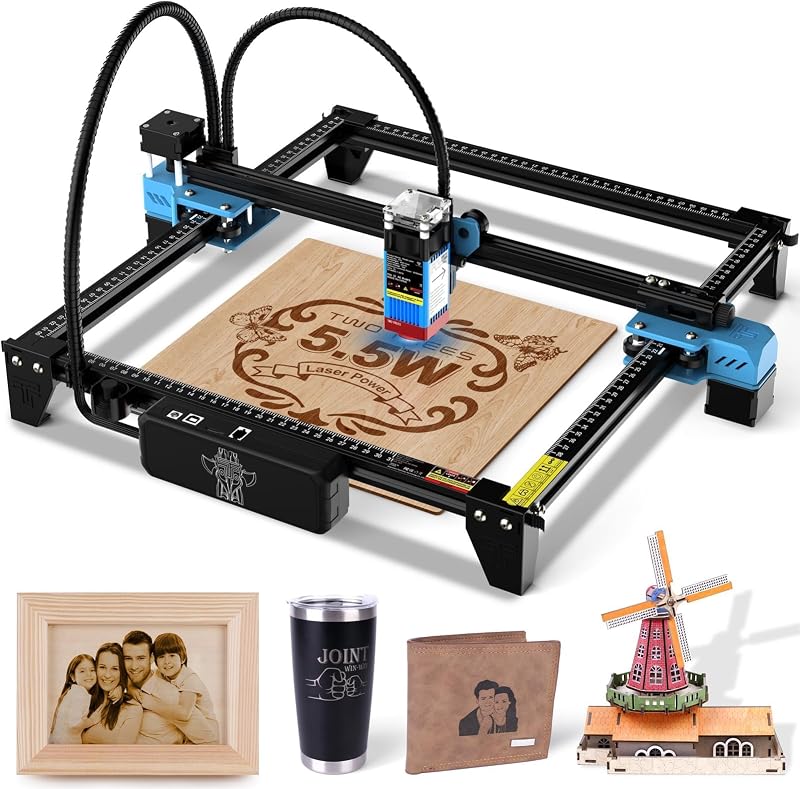
Another open-frame competitor is the Laser Cutter, sold as the Twotrees TTS-55 Pro Laser Engraver. This unit features a 300 x 300 mm work area, a 5500mW laser output, and a 0.08mm spot designed for DIY projects on wood, metal, acrylic, glass, and stainless steel. Makers looking for a defined 300 x 300 mm workspace with comparable 5.5W optical power will find it a direct alternative to the A5 Pro.
Final Verdict
So, is Atomstack A5 Pro worth it for the typical home maker? For crafters and DIY hobbyists seeking reliable mechanical accuracy, the machine proves to be a solid performer. Its all-metal aluminum structure and integrated screw rods eliminate the loose play common to entry-level engravers, allowing users to make the most of its tight 0.08mm compressed laser spot.
While the 5W to 5.5W output means heavy cutting requires patience and multiple passes, its fine detail on wood, dark acrylic, leather, and treated metal is impressive. With broad support across LaserGRBL and LightBurn, the Atomstack A5 Pro stands as a durable, dependable engraving workstation for any home maker space.
FAQ
What materials can the Atomstack A5 Pro cut and engrave?
According to the manufacturer specifications, the machine is designed to engrave wood, metal, acrylic, leather, and DIY craft materials. It can cut through 5mm plywood and sheets of black acrylic using its 5W to 5.5W compressed spot diode beam.
Can the Atomstack A5 Pro cut clear or white acrylic?
The listing highlights cutting capabilities on black acrylic. Diode lasers operating in the visible light spectrum generally pass through transparent and light-colored translucent acrylic without transferring heat, meaning clear and white acrylic cannot be cut effectively without special surface treatments or a different laser source.
Does the Atomstack A5 Pro work on Mac computers?
Yes, the Atomstack A5 Pro is compatible with Mac OS when used with LightBurn software. While the free LaserGRBL program is compatible only with Windows systems from XP through 11, LightBurn provides full functionality across both macOS and Windows platforms.
What is the benefit of the integrated screw rod design?
The integrated screw rod design replaces separate shaft couplings by connecting the drive screw directly to the stepper motor. This reduces mechanical vibration, prevents axis slippage during rapid direction changes, and supports running speeds up to 11000mm/min without sacrificing line precision.
Does the Atomstack A5 Pro come with a full enclosure?
The listing does not specify an included full enclosure. The machine features an open-frame Class 4 design with a UV-filtering acrylic protective shield around the laser head. Users should operate it in a well-ventilated room and wear approved eye protection at all times.