As Amazon Associates, we earn from qualifying purchases. This means we may receive a small commission at no extra cost to you if you click through and make a purchase.
The AmpliFi HD is a whole-home wireless networking system developed by Ubiquiti Labs that combines a base station router featuring an interactive smart touchscreen with two plug-in wall satellites to eradicate dead spots across multi-story living spaces. Although it relies on Wi-Fi 5 (802.11ac) standard architecture rather than newer wireless revisions, the kit delivers rock-solid connection stability, intuitive mobile app management, and responsive local throughput that handles concurrent high-definition video streams and family gaming sessions with minimal fuss.
This mesh package is tailor-made for busy households wanting reliable dead-zone elimination, physical Gigabit Ethernet connections for entertainment consoles, and simple smartphone-based network administration that does not require an advanced background in information technology. However, users seeking cutting-edge multi-gigabit throughput to saturate high-speed fiber tiers, or those requiring weather-hardened exterior nodes, should explore alternative setups built around newer wireless protocols.
AmpliFi HD at a Glance

| Attribute | Detail |
|---|---|
| Wi-Fi Generation | Wi-Fi 5 (802.11ac, compatible with 802.11a/g/n/ac) |
| Frequency Band Class | Dual-Band |
| Total Antennas | 3 Antennas (adjustable super antenna technology) |
| Ethernet Ports | 4 Gigabit LAN Ports, 1 Gigabit WAN Port |
| LAN Bandwidth | 1000 Mbps |
| Maximum Data Transfer Rate | 5.25 Gbps aggregate throughput (1300 Mbps upstream) |
| Base Station Controls | Smart LCD Touchscreen Display and Mobile App |
| Security and Encryption | WPA2-PSK, High Firewall Security Level, WPS |
| Operating System Compatibility | Android and iOS mobile devices |
Whole-Home Coverage and Dead-Spot Elimination
The standout feature of this amplifihd mesh router package is its deliberate hardware design centered on broad domestic coverage. Rather than forcing homeowners to rely on a single central broadcast point that weakens through drywall, plaster, and structural framing, the kit supplies two dedicated plug-in satellites known as AmpliFi MeshPoints. These satellites plug directly into any standard residential electrical outlet, eliminating cumbersome power bricks and messy desktop cabling in high-traffic hallways, bedrooms, or living spaces.
Ubiquiti Labs engineered these satellites with multi-directional, adjustable super antenna arrays attached by a magnetic ball joint. This physical flexibility allows users to angle the antenna head toward the primary base station, maximizing raw reception even across tricky floorplans. To take the guesswork out of installation, each satellite features an integrated column of signal strength LEDs along its face. These lights provide real-time visual feedback so you immediately know whether a chosen hallway socket is close enough to the main hub to sustain a dependable high-speed wireless link.
Once deployed, the amplifi mesh points work in tandem with the primary base unit to form a cohesive, self-optimizing wireless fabric. The hardware operates on dual-band 802.11ac radios, steering connected phones, tablets, and smart appliances between nodes automatically as family members move from room to room. When paired with rural broadband gear such as a starlink complete kit, the wide amplifi hd range ensures that satellite internet connections get distributed evenly to remote corners of the house where weak signals previously caused dropped video calls and buffering wheels.
Base Station Design and Touchscreen Display
Unlike typical consumer networking hardware that resembles an industrial black box with sprawling external prongs, the main base hub of the AmpliFi HD adopts a compact, minimalist cube chassis finished in clean white matte. It blends smoothly into living room entertainment centers, kitchen counters, or open home office desks without demanding concealment behind furniture, which naturally aids wireless propagation by keeping the internal antennas uninhibited by cabinets or desks.
The centerpiece of this base station is the round smart LCD amplifi hd touchscreen router interface. With a gentle tap on the glass, the screen cycles through various essential network diagnostics, including real-time download and upload speeds, active IP assignments, current date and time, and overall system status. This direct physical feedback lets family members verify whether an internet outage is originating from the local router or the upstream service provider without ever opening an app or logging into a browser dashboard.
Around the back of the base unit, the amplifi hd specs reveal strong hardware connectivity for stationary equipment. The router integrates four dedicated Gigabit Ethernet LAN ports alongside one dedicated Gigabit WAN port. In modern family households where low-latency online gaming and uninterrupted 4K video streaming are priorities, having four high-speed physical ports right on the hub makes it straightforward to hardwire desktop computers, network-attached storage, smart televisions, and home entertainment consoles with the included Ethernet cable.
Network Setup and the AmpliFi Mobile App
Streamlining complex network engineering into accessible household tools is where the amplifi hd mesh router setup truly excels. Many older home networking systems required navigating confusing browser-based setup wizards, manually entering IP addresses, and rebooting modems multiple times. Ubiquiti Labs bypassed that friction entirely by pairing the hardware with the dedicated AmpliFi companion app, available for both iOS and Android smartphones.
Initial configuration takes approximately five minutes from the moment the base hub is powered on. The app connects to the hardware via low-energy wireless pairing, identifies your broadband connection automatically, and guides you through setting a personalized network name and secure WPA2-PSK password. Once the router is established, you simply insert the two satellites into wall outlets across the home; they automatically find the base station, sync configurations, and begin expanding the broadcast envelope without requiring manual pairing buttons or extra configuration steps.
Beyond initial installation, the AmpliFi mobile interface acts as a full-featured mission control center for household networking. It provides clear reporting metrics regarding connected device counts, bandwidth consumption by client, and real-time network throughput graphs. Remote access features also allow parents or household managers to adjust router settings, run diagnostic performance checks, or create temporary guest networks even when they are away from home.
Family Management, Security, and Long-Term Value
When selecting networking gear for an active home, daily management tools matter just as much as raw broadcast speeds. The amplifi hd parental controls built into the mobile app provide parents with straightforward controls over children’s online access. From the client list, specific devices can be grouped into custom profiles, allowing parents to pause internet connectivity during dinner hours, establish recurring bedtime shut-off schedules, or grant temporary access with a single tap.
Security is maintained through a high-level internal router firewall combined with enterprise-grade firmware engineering derived from Ubiquiti’s commercial networking heritage. Household guests can be placed on an isolated guest network that allows basic internet browsing while strictly cordoning off private networked devices, shared storage folders, and smart home appliances. The hardware also supports Wi-Fi Protected Setup (WPS) to easily pair compatible peripherals like network printers without exposing your core WPA2 password.
In deciding whether the amplifi hd for home deployment makes practical sense, durability and long-term stability must be weighed against newer market protocols. While modern multi-band Wi-Fi 6 systems like the tp-link deco xe75 2-pack provide wider frequency channels for dense device environments, the AmpliFi HD provides a time-tested, self-healing dual-band mesh foundation. For standard residential internet connections where rock-solid reliability, simple operation, and intuitive physical controls take precedence over chasing theoretical wireless speeds, this system remains an exceptional value-focused hub.
AmpliFi HD Pros and Cons
Pros
- Smart LCD touchscreen for instant network status
- Four Gigabit LAN ports on base station
- Adjustable super antennas with signal strength LEDs
- Five-minute guided setup via smartphone app
- Self-optimizing mesh coverage eliminates dead spots
Cons
- Built on Wi-Fi 5 rather than newer standards
- Wall-plug mesh points lack physical Ethernet ports
- Dual-band design lacks dedicated third wireless backhaul
Who Should Buy the AmpliFi HD
Buy It If
- You live in a multi-story or sprawling home with persistent dead zones that require multiple plug-in nodes to blanket effectively.
- You want an interactive base station touchscreen to check speeds, network status, and time without opening an app.
- You need four dedicated Gigabit LAN ports on the primary router for wired gaming rigs, smart TVs, or desktop setups.
- You prefer a rapid, five-minute smartphone setup accompanied by easy-to-use parental controls and guest network management.
Skip It If
- You subscribe to multi-gigabit fiber plans and require Wi-Fi 6 or Wi-Fi 7 hardware to maximize data transfer rates.
- You require physical Ethernet backhaul ports on the satellite points, as these wall-plug units are wireless-only extenders.
- You need weatherproof outdoor broadcast capability, where dedicated outdoor nodes such as the tplink deco outdoor are better suited for yard coverage.
AmpliFi HD Alternatives Worth a Look
While the AmpliFi HD delivers an exceptionally friendly ownership experience, looking at newer multi-node mesh alternatives can help you determine whether modern wireless protocols or wired satellite backhauls better match your domestic layout.
Covers up to 6500 Sq.Ft.
4.8 out of 5, average from Amazon buyers
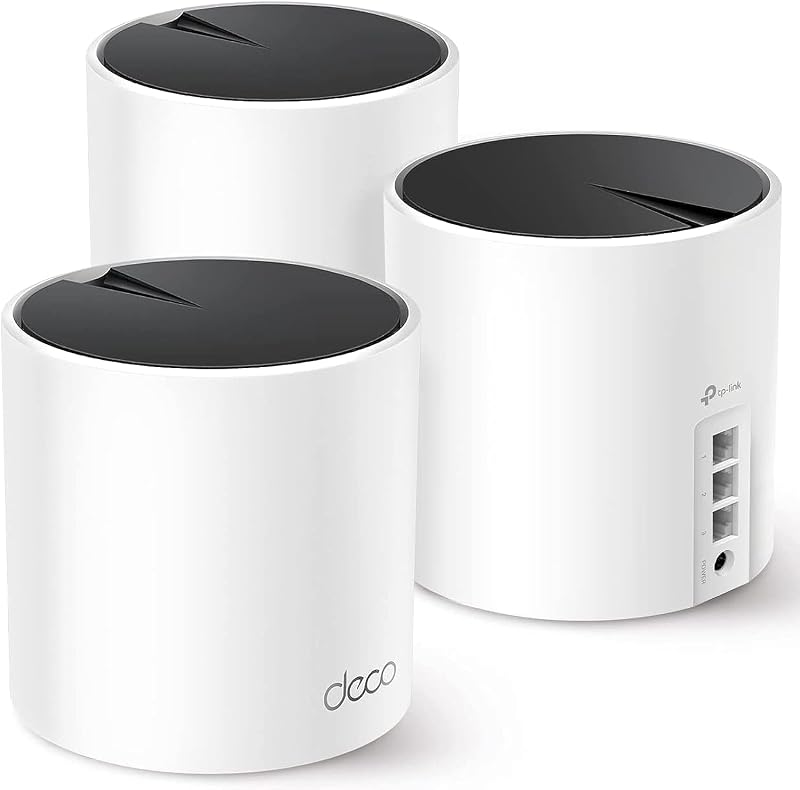
The Covers up to 6500 Sq.Ft. Deco X55 AX3000 mesh package is an alternative three-pack system powered by Wi-Fi 6 technology. This setup features three Gigabit Ethernet ports on every individual unit and provides full support for wired Ethernet backhaul, making it an appealing upgrade for homeowners who already have network cables running through their interior walls.
Shoppers who manage dozens of smart home accessories or who want the higher efficiency of the 802.11ax standard across widespread square footage should consider this Deco X55 alternative over the Wi-Fi 5 architecture of the AmpliFi kit.
Up to 6,600 Sq.Ft
4.4 out of 5, average from Amazon buyers

The Up to 6,600 Sq.Ft Deco BE25 package brings the cutting edge of wireless technology to home networks by incorporating dual-band Wi-Fi 7 with speeds up to 5 Gbps across 240 MHz channel widths. Each node includes two 2.5G multi-gigabit wired backhaul ports, AI-Roaming intelligence, and integrated VPN support.
This kit is the better match for technology enthusiasts who possess high-bandwidth fiber connections exceeding 1 Gbps and want modern features like Multi-Link Operation (MLO) to future-proof their domestic connection environment.
4 x 2.5G Ports Wired
4.6 out of 5, average from Amazon buyers

The 4 x 2.5G Ports Wired Deco BE63 system is a tri-band Wi-Fi 7 powerhouse engineered to blanket estates up to 7,600 square feet with aggregate speeds reaching 10 Gbps across six spatial streams. It packs four 2.5G Ethernet ports directly onto each unit alongside four smart internal antennas.
Demanding multi-user households engaged in high-throughput local network transfers, heavy NAS backups, and competitive online gaming will benefit from picking this premium tri-band infrastructure over standard dual-band Wi-Fi 5 hardware.
Final Verdict
When asking is amplifi hd worth it for a busy family residence, the answer comes down to software stability, physical design, and ease of ownership. Ubiquiti Labs successfully stripped away the headache of home network administration by delivering an elegant hardware package that installs in minutes and runs quietly in the background. The combination of plug-and-play wall satellites, adjustable super antenna arrays, and a distinct front-facing touchscreen transforms home networking from an intimidating technical chore into an approachable, user-friendly utility.
While enthusiasts running multi-gigabit connections or looking for Wi-Fi 6E and Wi-Fi 7 bands may outgrow its dual-band 802.11ac ceiling, the AmpliFi HD continues to hit the sweet spot for everyday reliability. With four Gigabit Ethernet ports for essential wired hardware, reliable parental schedules to keep kids focused during homework hours, and zero complex network maintenance required, it represents a sturdy and durable mesh solution that provides long-term peace of mind for family households.
FAQ
How difficult is the AmpliFi HD mesh router setup for non-technical users?
The setup process is designed specifically for non-technical users and takes approximately five minutes using the official AmpliFi mobile app for iOS or Android. The app automatically detects the base router, guides you through naming your network and choosing a password, and seamlessly connects the pre-paired wall mesh points as soon as you plug them into standard electrical outlets.
Can you plug Ethernet cables directly into the AmpliFi mesh points?
No, the two included AmpliFi MeshPoints do not contain Ethernet ports. They are designed exclusively as wireless wall-plug nodes that expand Wi-Fi coverage across rooms; however, the primary AmpliFi HD base station includes four Gigabit Ethernet LAN ports to connect wired devices like gaming consoles, desktops, or network storage directly.
How do the AmpliFi HD parental controls work for family devices?
The parental controls are managed directly inside the AmpliFi smartphone app without requiring any recurring subscriptions. Parents can organize connected household devices into distinct profiles, pause internet access instantly across selected hardware, and create scheduled bedtime or homework downtime windows to manage daily screen time effectively.
Does the AmpliFi HD support newer Wi-Fi 6 or Wi-Fi 7 client devices?
Yes, newer smartphones, tablets, and laptops featuring Wi-Fi 6 or Wi-Fi 7 network cards will connect seamlessly to the AmpliFi HD system. Wi-Fi standards are backwards compatible, meaning modern devices will operate reliably using the router’s 802.11ac (Wi-Fi 5) dual-band channels.
What information appears on the AmpliFi HD touchscreen router display?
The smart LCD touchscreen on the base station displays real-time internet download and upload throughput, system connection status, total data usage metrics, local and wide-area IP addresses, as well as a clean digital clock face when the unit is idling, allowing you to check performance with a simple tap.


